Participant
January 8, 2021
Question

Can't animate text scaling properly

  • January 8, 2021
  • 1 reply
  • 177 views

Hello there


I'm new to Premiere Pro.

Trying animate text width scaling.

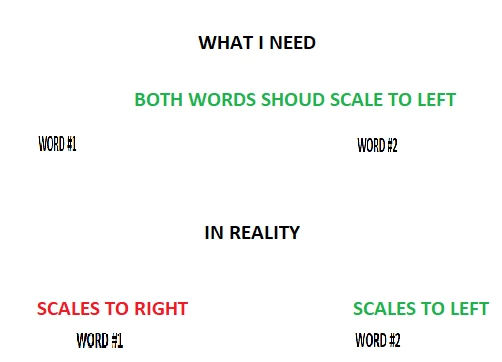
I've tried to explain the situation in pic attached.

So I have two words. One is on the left part of the screen and another is on the right side.

When I scale, one word scales to left and another to right. But I need them both to scale to the left.

I was surprised when I placed these words on the same half of the screen and the starting scaling to the same direction. That's so wierd. Have been trying to solve it for hours. Can't find any solution anywhere.


How should I fix this?
 

This topic has been closed for replies.

1 reply

R Neil Haugen
Legend
January 8, 2021

The problem is they have different settings for whether they're set to left, center, or right align. Check in the Edit tab of the Essential Graphics Panel (EGP). Select each text layer in the top section, then look down at the alignment icons.


You can set most text options from alignment, size, rotation, fill, stroke, even keyframing from either the EGP or the Effects Control Panel (ECP). Sometimes it's handier to use one or the other, but you do need to know what's set in one when working the other.


Neil

Everyone's mileage always varies ...