


Participant
May 18, 2024 5:14 AM UTC
Question

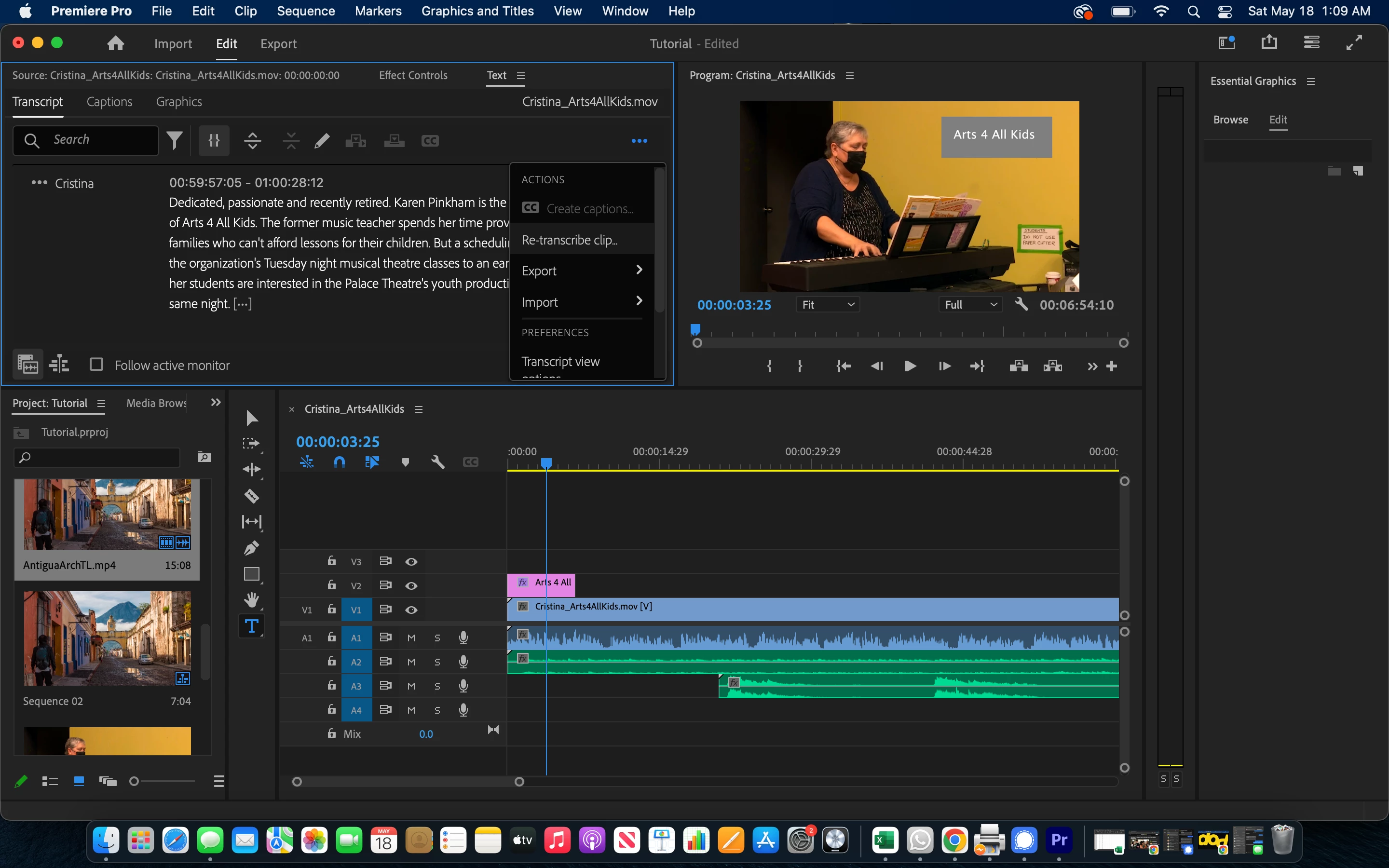
Can't Create Captions from Transcript

I am trying to create captions for my video from the Transcript area, but the option to create captions is greyed out. I have been Googling and reading discussion posts, but have not come across anyone with the same problem. Please help!  What am I doing wrong?
5 replies

Participant
May 9, 2025 2:40 PM UTC

Update your Adobe premiere in your cloud. This should fix any bugs

Translate
nowthen
Participant
Nov 11, 2024 10:53 PM UTC

Did you ever find a solution? Having the same issue.

Translate
Participant
Nov 11, 2024 11:40 PM UTC
Yeah, I basically restarted my computer and it worked 🤷🏻‍♀️
Translate
Community Expert
Nov 12, 2024 7:53 AM UTC

From the screenshot, it looks like you're viewing the transcript in the Source Monitor.

To enable the Create Captions button, try one of the following:

  • Click the small Timeline icon in the bottom left of the Text panel.
  • Or, tick Follow active monitor, then click the Timeline panel, and return to the Text panel.
Translate
Community Expert
May 18, 2024 8:04 AM UTC

make sure you follow the instructions:

https://helpx.adobe.com/premiere-pro/using/speech-to-text.html

Translate