


Can't drag and drop any effects into timeline
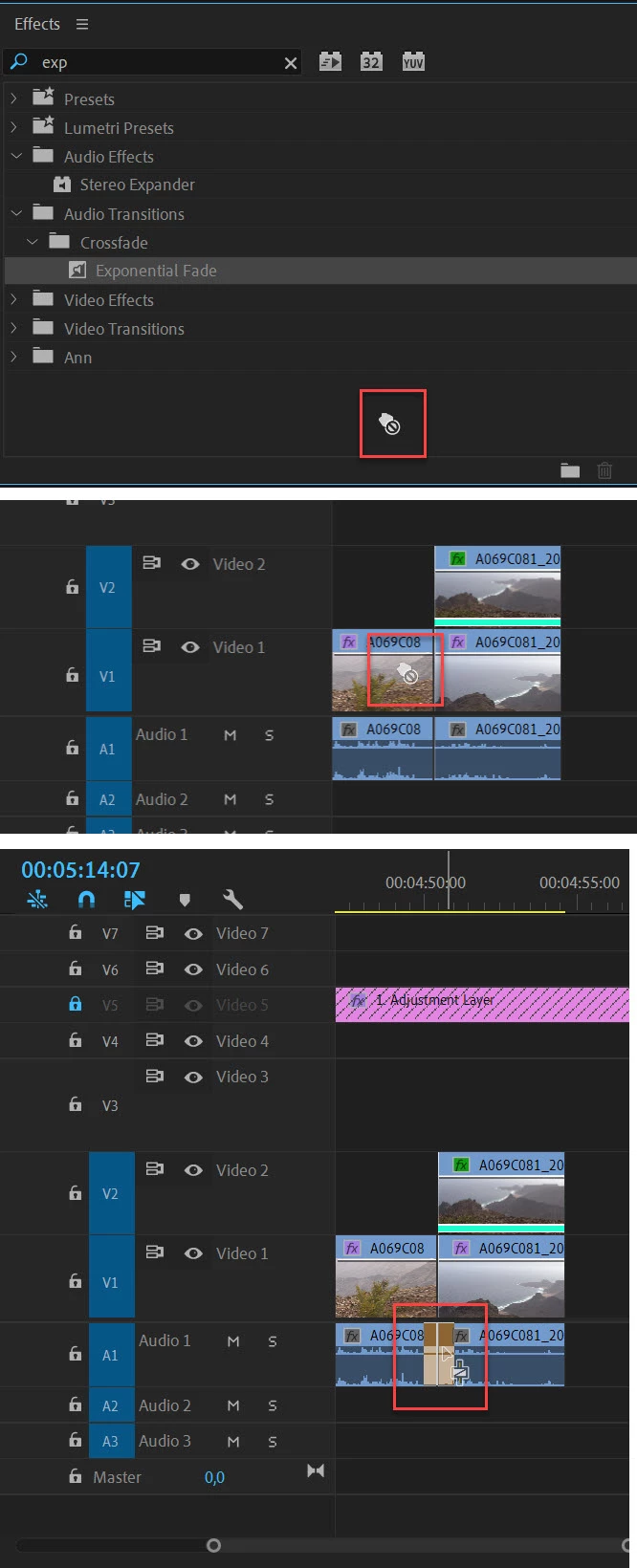
Hi, I've been working on a project for two days and suddenly Pr stopped allowing me to drag effects into my timeline. I can drag anything else I want, and through keyboard shortcuts, I can apply default transitions to my clips. However, I cannot open the editing window, select an effect, and simply drag it in. When I try, my cursor becomes a grabbing hand with a little crossed circle beside it informing me that I cannot drag the effect.
I have tried resetting the project, resetting all my preferences and caches, resetting to adobe's saved layout for workspaces,read other community posts about similar issues and have tried all the methods that were brought up in those threads, and nothing seems to work.
My only option now it seems, is to reinstall Pr, and start the project from scratch if I want to drag effects into my timeline. That's my last resort if anything, but I hope a community member has a simple answer for me that I'm too dumb to see lol. Thank you!

 AdChoices