


Inspiring
July 16, 2026
質問

can't export drop-frame video

I’ve got a drop-frame (DF) 29.97 sequence (semicolons indicate DF):
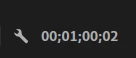
When I export out of this sequence, I can only get non-drop-frame (NDF) video (colons).


The sequence has a mixture of DF and NDF sources. If I export a section of the sequence that has only DF, the exported video is DF. But if the export includes NDF video, the exported video is NDF.


Unfortunately for me, my broadcast client requires DF, no way around it.


I have tried:

  1. Rebooting
  2. Updating Premiere to 26.2
  3. Sending to Media Encoder and toggling Metadata on, then tweaking those settings, including Export Options set to Embed Output File or Minimum required. 
  4. Toggling Set Start Timecode (which shows 00;00;00;00, semicolons)
  5. Emptying Media Cache
  6. Creating a new Premiere project and recreating the sequence
  7. Shaking fist at the computer gods who mock me.

Any ideas or thoughts would be amazing, folks.

    返信数 6

    Stan Jones
    Community Expert
    Community Expert
    July 17, 2026

    @jon6569,


    > Shaking fist at the computer gods who mock me.

    That always works for me!


    Editing is always more fun when you keep your sense of humor. That one made me smile.


    Stan


    MyerPj
    Community Expert
    Community Expert
    July 17, 2026

    Oh, I should have noted, I was exporting from Pr, and not sending to ME.

    Community Expert
    July 17, 2026

    What are you export settings?

    MyerPj
    Community Expert
    Community Expert
    July 16, 2026

    I just tried it on the shipping version 26.3 and it works as expected also, same as in my post below.

    MyerPj
    Community Expert
    Community Expert
    July 16, 2026

    I just tried it with two clips one NDF one DF, in PR beta, with the sequence display format time-code set to 29.97 fps Drop-Frame, and exported and the video came out as drop-frame. (Pr 25.5 b62 / Win11 25H2)

    Warren Heaton
    Community Expert
    Community Expert
    July 16, 2026

    Hi ​@jon6569:

    Go to Sequence > Sequence Settings… > General > Video > Display Format and double-check that you’re set to “29.97 fps Drop-Frame Timecode” instead of “29.97 fps Non-Drop-Frame Timecode”.  Both show with semi-colons when viewing Timecode.


     - Warren

    jon6569作成者
    Inspiring
    July 16, 2026

    Thanks, Warren. Sequence setting is Drop-Frame. Also verified by right-clicking to the right of the sequence timecode above the layers: