


Known Participant
Dec 22, 2024 10:12 PM UTC
Question

Can't export to Shutterstock in ProRes format

I'm trying to export video for use on Shutterstock. I have done so using H.264 with no problem but when I try ProRes it will not work on SS.  When uploaded and I select view a larger preview, I get a message: "No video with supported format and MIME type found" and it will not play.  SS support is telling me to turn of HDR - which I did not think was on, since I have not checked the box shown below - yet it seems like it picks one of the three options anyway.  I don't know if this is really the issue at all, maybe support is mistaken.
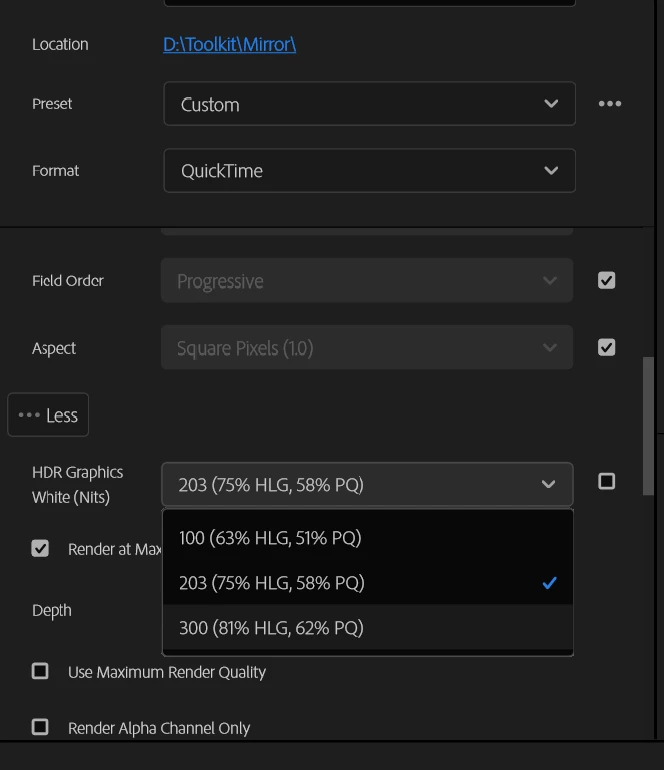
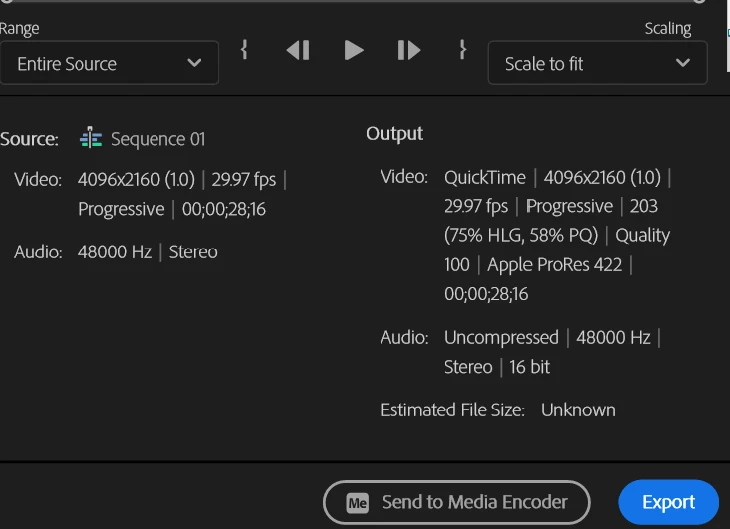
Below are the settings showing in the export screen.


This topic is closed to new replies. Start a new post to keep the conversation going.

7 replies

Known Participant
Dec 23, 2024 4:56 PM UTC

Can anyone help me on this one?

Translate
R Neil Haugen
Legend
Dec 23, 2024 5:03 PM UTC

Start your Export with a QuickTime preset selecting ProRes 422. As long as the framesize/rate match your sequence (they wiill) don't change anything but the name/location of the export.

Translate
Everyone's mileage always varies ...
Known Participant
Dec 23, 2024 5:33 PM UTC

OK, thanks. I will try starting from scratch.

Translate
R Neil Haugen
Legend
Dec 22, 2024 11:52 PM UTC

Which ProRes preset did you start with? Avoid those with HLG or PQ in the preset name, as those are HDR.

Translate
Everyone's mileage always varies ...
Known Participant
Dec 23, 2024 12:13 AM UTC

Thanks for replying. I did't use a preset to start with.  I used custom and picked the settings that I thought were right.  I haven't treid to export in anything but H.265 before - kinda dumb to this....:)

Translate
R Neil Haugen
Legend
Dec 23, 2024 3:47 AM UTC

I've never heard of starting an export by choosing custom. Didn't ever see that as an option.


I just select the format and then the specific one i want from the list. I rarely have needed to make any changes.

Translate
Everyone's mileage always varies ...