Participating Frequently
August 20, 2017
Answered

Can't figure out how to export an HD video to YouTube

  • August 20, 2017
  • 3 replies
  • 1212 views

I have just recently started using Premier Pro.  I am putting together a video for YouTube using multiple separate short videos.  The imported videos are all HD, and when I finish editing the clips, I have used the native settings for exporting them.  I have chosen mpeg4 for the format.  Although I have played with the other settings, once I export the video, the playback resolution is low.  This is whether the video is played on my computer or published on YouTube.  I can't figure out why the clips are downgraded to SD.

Thanks
This topic has been closed for replies.
Correct answer Ann Bens

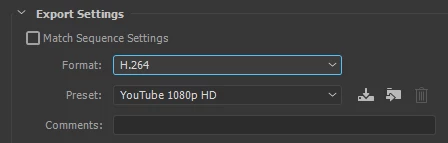
Dont use mpeg4 but H.264 as format then select a youtube preset.

3 replies

Inspiring
August 21, 2017

Glad you figured it out. Might I suggest a class at an Adobe Certification Training Center? Adobe has a list. Might help.

Ann Bens
Community Expert
Community Expert
August 21, 2017

I would go for Lynda.com

Ann Bens
Community Expert
Community Expert
August 21, 2017

Adobe Certification Training Center

Is that for beginners? Imo More likely for folks how want to get certified?

Ann Bens
Community Expert
Ann BensCommunity ExpertCorrect answer
Community Expert
August 20, 2017

Dont use mpeg4 but H.264 as format then select a youtube preset.

jcadkinsAuthor
Participating Frequently
August 20, 2017

Thanks to Katie and Ann.  Your suggestions got everything straightened out.  Many of the options aren't intuitive.

Inspiring
August 20, 2017

At you using a preset like H.264 or are you customizing? What are your settings for sequence & output?

jcadkinsAuthor
Participating Frequently
August 20, 2017

I am a rank novice in Pr Pro.  I have chosen H.263, which was on the menu.  I haven't changed any settings for sequence and output.  I can't even find the selection dropdowns for them.

Legend
August 20, 2017

I am a rank novice in Pr Pro.

Solve that before you start a real project.

Adobe Premiere Pro Learn & Support