
Participant
August 1, 2020
Answered

Can't find mask symbols
  • August 1, 2020
  • 3 replies
  • 787 views


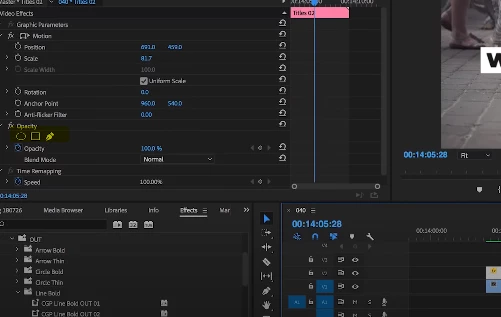
Hello. I'm new to Premiere Pro and watched a video about masking. The marked symbols were necessary for doing it but I can't even find them. All videos I've seen just automatically have them but my opacity tab just looks like this
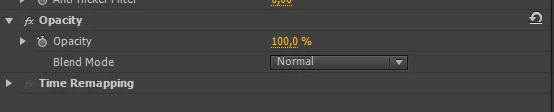


This is proabably a stupid question but I'm new so any help is appreciated

This topic has been closed for replies.
Correct answer Ann Bens

Nope no update.

You will have to take a subscription for CC if you want to use this particular feature.


Garbage matte will act as a mask as well.

3 replies

John GR
Participant
November 26, 2020

Hello.

I have the same problem with mask and symbols. I use Premiere Pro CC 7.2.0. Any ideas ?

Thanks

Ann Bens
Community Expert
Community Expert
November 26, 2020

No mask feature in 7.2.0.

Might want to get yourself a subscription.

John GR
Participant
November 27, 2020

thanks man 🙂


Ann Bens
Community Expert
Community Expert
August 1, 2020

Gathering from the screenshot you are using CS6?

Maskes were not added until later builds.

Participant
August 1, 2020

I appaerently have CS6. Is an update available for free because I haven't seen an option to update it?

Ann Bens
Community Expert
Ann BensCommunity ExpertCorrect answer
Community Expert
August 1, 2020

Nope no update.

You will have to take a subscription for CC if you want to use this particular feature.


Garbage matte will act as a mask as well.

Community Expert
August 1, 2020

Which version of Premiere do you have? Look under Help- About Premiere Pro