Participant
April 28, 2020
Answered

Can't get audio in premiere pro

  • April 28, 2020
  • 2 replies
  • 694 views

Hello everyone,


For my work i am making a stopmotion film, and i want to put some background music in it. Premiere pro doesn't allow audio in this video for some reason. I have followed these instructions: https://helpx.adobe.com/premiere-pro/how-to/add-music-sound-video-project.html


So i believe it should work. I cannot understand why the audio doesnt work, does anybody know what i'm doing wrong? I put a screenshot below for some more info.
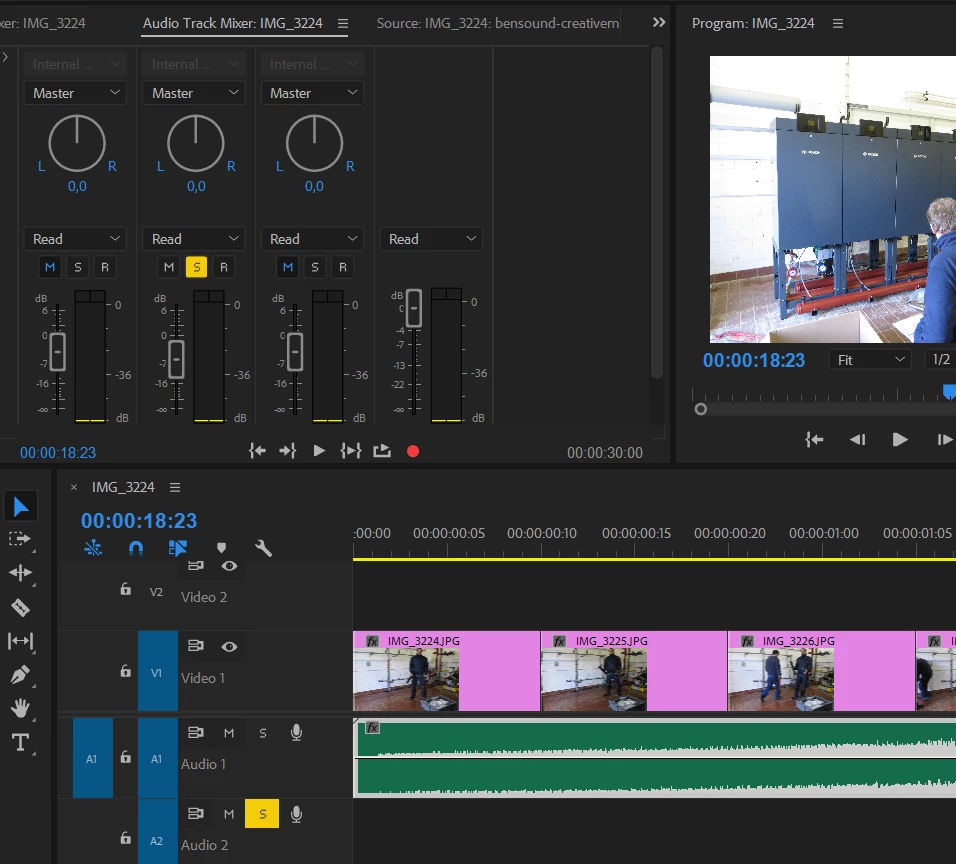
 

I hope somebody can help me.


Kind regards,


Dorien Eising


This topic has been closed for replies.
Correct answer Richard M Knight

Is your music on track A1? if so you have the solo button pressed for A2, just click on the yelloiw solo box for A2  to deselect

2 replies

Richard M KnightCommunity ExpertCorrect answer
Community Expert
April 28, 2020

Is your music on track A1? if so you have the solo button pressed for A2, just click on the yelloiw solo box for A2  to deselect

Participant
April 28, 2020

It worked, thanks for helping! I just started out in this program, so i really didn't understand why it wasn't working. Funny that it was such a simple thing

Community Expert
April 28, 2020

At which stage does it not work? importing using media browser, adding to the timeline. Does it play in the source monitor?

Participant
April 28, 2020

There is no problem with importing in the media browser or adding to the timeline. When i play the video, there is no audio.