swapnil_dwello
Participant
June 27, 2020
Answered

Can't get hardware acc to work on Premiere Pro CC 2020

  • June 27, 2020
  • 3 replies
  • 791 views

Hello, I'm unable to get hardware acceleration to work on Premiere Pro and other CC apps (AfterEffects, Media Encoder) for that matter. My system specifications are:

  • Intel Core i7 4790 (non-K)
  • 2 x 8GB DDR3 RAM
  • AMD Radeon RX Vega 64 8GB [Radeon Driver 20.5.1]
  • Windows 10 Build 2004
  • Premiere Pro 14.3.0, AfterEffects 17.1.1, Media Encoder 14.3


When I open Media Encoder, GPU acceleration options are greyed out

 

In Premiere Pro and AfterEffects, I get this dialog even after installing the latest Intel Drivers
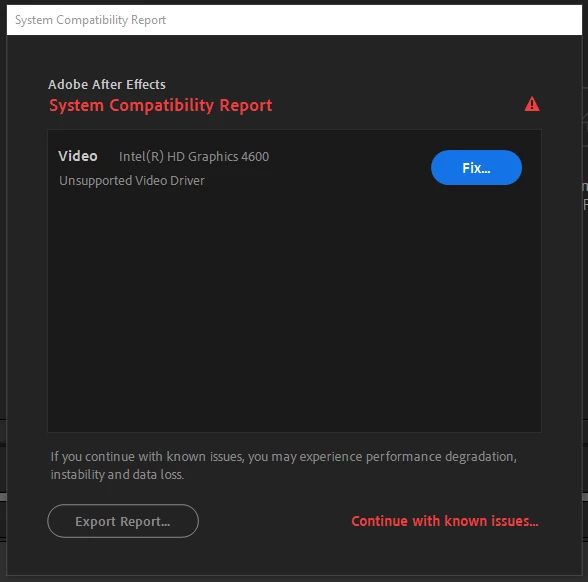
 

Please help me out

This topic has been closed for replies.
Correct answer RjL190365

You will need to completely disable the Intel HD Graphics in the system's BIOS setup because you had a major conflict between the integrated Intel HD Graphics 4600 and the AMD Radeon RX Vega 64. And since both used OpenCL, Premiere would always default to the integrated Intel graphics for the purposes of GPU acceleration - and then, since the integrated graphics was too old for Premiere Pro 14.x, you would be locked to the software-only mode.


And the BIOS method of disabling the integrated Intel HD Graphics depends on the motherboard or system manufacturer itself.

3 replies

RjL190365Correct answer
Legend
June 28, 2020

You will need to completely disable the Intel HD Graphics in the system's BIOS setup because you had a major conflict between the integrated Intel HD Graphics 4600 and the AMD Radeon RX Vega 64. And since both used OpenCL, Premiere would always default to the integrated Intel graphics for the purposes of GPU acceleration - and then, since the integrated graphics was too old for Premiere Pro 14.x, you would be locked to the software-only mode.


And the BIOS method of disabling the integrated Intel HD Graphics depends on the motherboard or system manufacturer itself.

swapnil_dwello
Participant
June 30, 2020

Thank you very much. I set primary graphics to PCIe from my motherboard and disabled CPU Graphics multi-monitor.

Community Expert
June 28, 2020

Have you tried Preniere CC 2020 version 14.3, that has more options for hardware support.

swapnil_dwello
Participant
June 30, 2020

Yes. That is the exact version I'm using.

Ann Bens
Community Expert
Community Expert
June 27, 2020

I am guessing the intel is too old (as in obselete) for the new Pr 2020: hence the message.


swapnil_dwello
Participant
June 28, 2020

Yes indeed. I want it to use my VEGA and Hardware acceleration.