
inca431
Inspiring
December 14, 2017
Answered

Can't hear audio on track 3

  • December 14, 2017
  • 3 replies
  • 7620 views

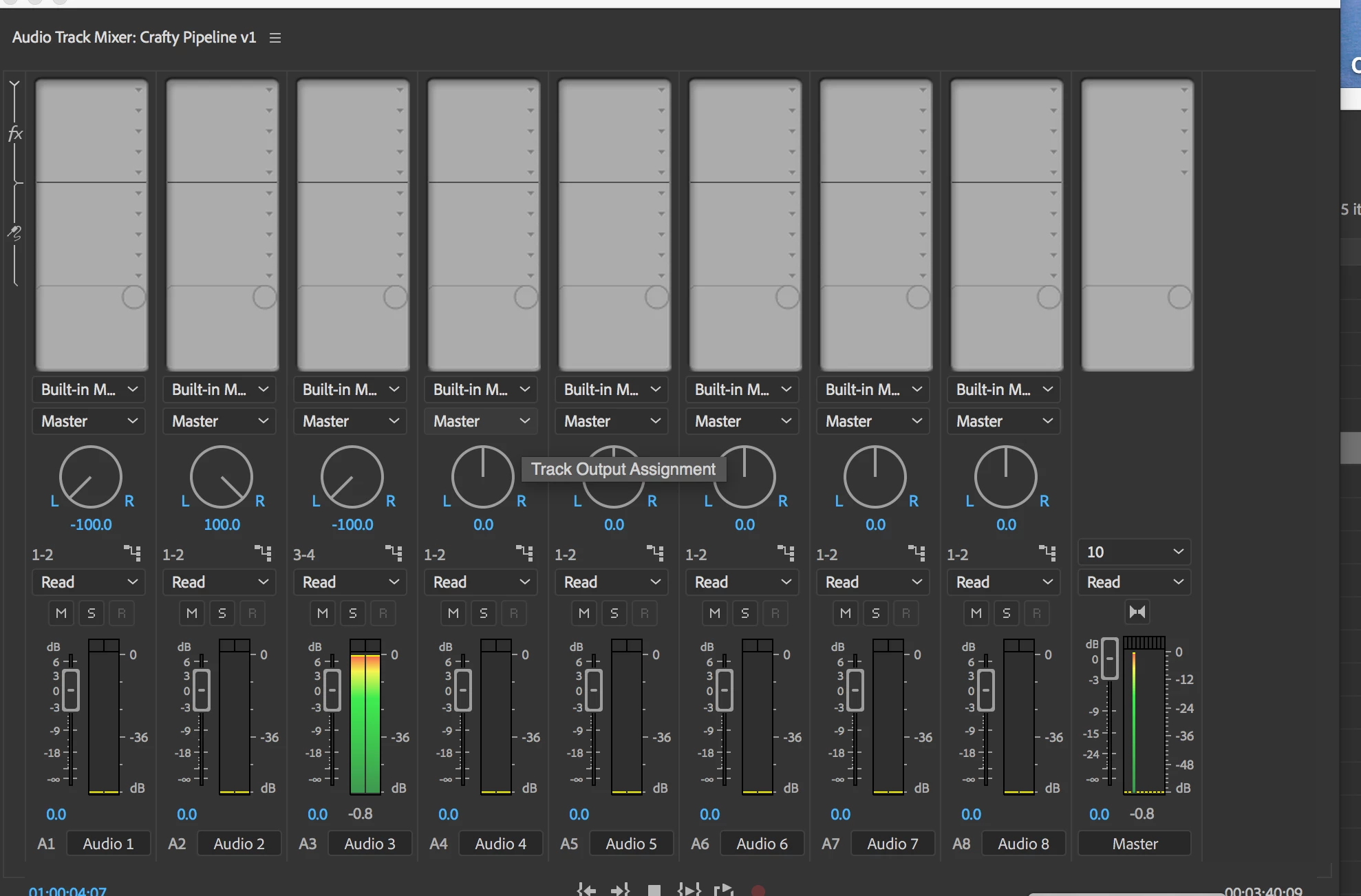
for some reason, I can't hear any audio I place on track 3.  I can see the waves in the wave form, I can see the meters ...  every other track is fine.  If I move the audio for track 3 to any other track, I can hear it fine.  It has something to do with that track and I can't figure out what I've set wrong.  I've quit and restarted Premiere... I've quit and restarted the MAC.  I've listened to other sequences, and they all play track 3 fine.  It's only this sequence, it's only track 3...  I would attach a photo of my screen, but I don't think I can attach a file here?

Thanks all! chris
    Correct answer inca431

    Hey, Neil, someone on the facebook group figured it out!  I had it routed to 3-4!!  thanks for the quick response... chris

    3 replies

    ashrafaabduabdullah
    Inspiring
    April 10, 2018

    Figured it out, with Adobe Support Representative, who will esclate the issue to his seniors, it is a bug, which can be solved by the following steps:

    Duplicating the sequence:

    1- From the bin, right click on the sequence and from the menu click duplicate.

    2- Do not touch/change the sequence settings. Just duplicate it.

    3- Ignore the original sequence and work on the duplicated copy.

    you will hear all the tracks and the time line will work smoothly. 

    Inspiring
    April 11, 2018

    i have some problems with audio too since the latest update. What i found out:

    sometimes switching any track of audio to solo and back helps.

    sometimes the track routings and pan settings change to weird settings like output to 7-8 in a 4 track-sequence and so.

    this affects the export of files also, so one has to be very careful.

    ashrafaabduabdullah
    Inspiring
    April 12, 2018

    Hi Daapap, for some reason i cant get you clearly, please elaborate more, and try to capture the screens, and on which version and OS your PR is installed

    ashrafaabduabdullah
    Inspiring
    April 9, 2018

    Could you please show me how did you fix it

    R Neil Haugen
    Legend
    December 14, 2017

    If you've got a typical png screen-grab, you can drag/drop it onto the reply box, or use the flower-in-a-box icon to navigate to and select a png/jpg image to include in your post.

    It would be good to see your timeline's track header settings, and if you've got any routing of tracks setup, a screen-grab of those settings.

    Neil

    Everyone's mileage always varies ...
    inca431
    inca431AuthorCorrect answer
    Inspiring
    December 14, 2017

    Hey, Neil, someone on the facebook group figured it out!  I had it routed to 3-4!!  thanks for the quick response... chris

    R Neil Haugen
    Legend
    December 14, 2017

    I was wondering if some kind of re-routing had happened ... which is why I asked for any routing you may have done.

    Glad you're working.

    Neil

    Everyone's mileage always varies ...