


Participant
February 8, 2025
Answered

Can't hear channel 3 and above

  • February 8, 2025
  • 3 replies
  • 340 views

Hi,

I just downloaded Premiere Pro again ater formatting my laptop.

I have 3 channels in my sequence that I'm trying to play with multichannel 3 to 6, but I can't hear tracks 3-6.

This worked for me just fine beofre formatting the laptop, but maybe I'm forgetting something in the configuration.

I know the solution to change it to Stereo instead, but I really need the separated channels to 6 because I need the final export to be in separated channels for each track.


This is how it looks like.
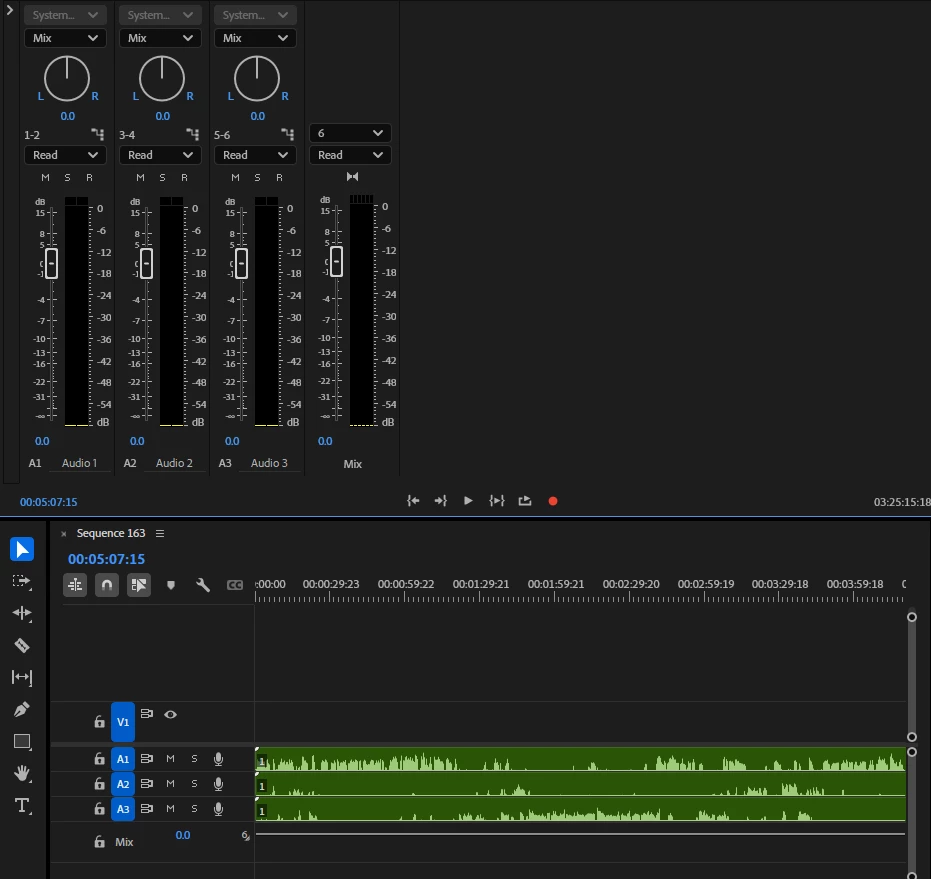
What am I missing?
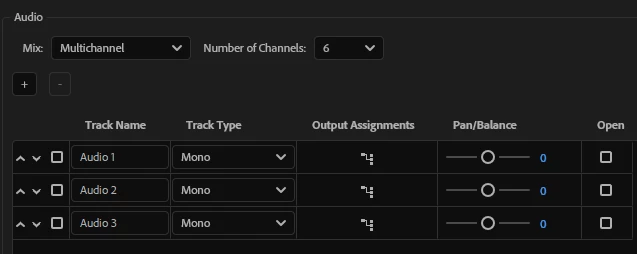
Correct answer yaelbicho

I found the solution.

When creating a new sequence I changed the Type to Mono for all the channels.


3 replies

yaelbichoAuthorCorrect answer
Participant
February 9, 2025

I found the solution.

When creating a new sequence I changed the Type to Mono for all the channels.


yaelbichoAuthor
Participant
February 11, 2025

Okay my mistake, this didn't help!

The weird thing is that I can see the audio in the monitor, meaning the mapping is correct, but I can't hear it.

I also opened an old sequence from before the pc formatting, but I still have the same problem.

So I'm pretty sure this something about the configuration/mapping of the hardware...

Community Expert
February 8, 2025

There may be better ways but I would make an eight channel multitrack send everything to 1 and 2, this will let you hear everything, then send selected audio to 3-8 as your cleanfeed tracks.