Inspiring
October 25, 2021
Answered

Can't move keyframes in small increments

  • October 25, 2021
  • 2 replies
  • 1987 views

I can only move keyframes in 20-frames increments. 


Snap is turned off, both in the Timeline and in the Effect Controls' dropdown menu.


I've tried changing those snap settings to any available option, but they don't have effect at all, which is peculiar in itself, I think.
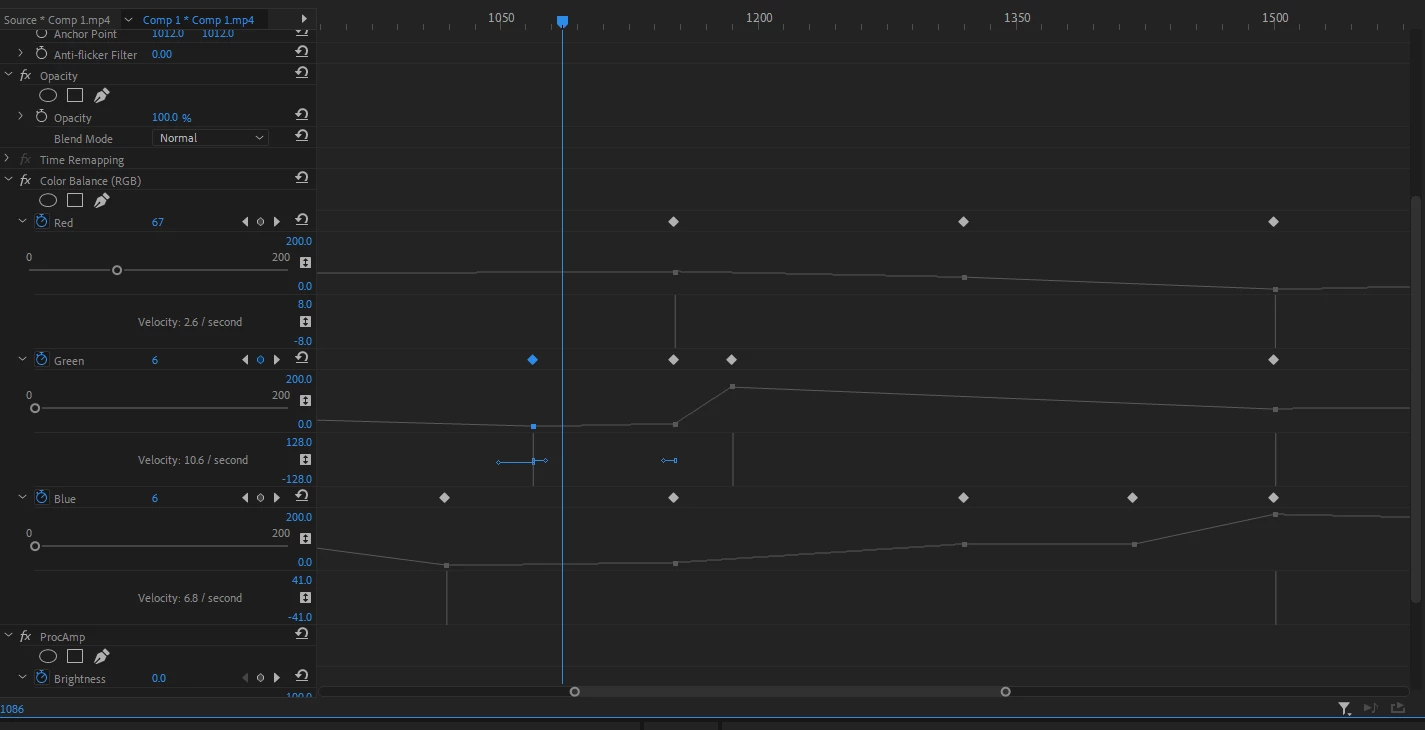


Am I missing some kind of lock or other snap option?

This topic has been closed for replies.
Correct answer sebastian2012a

Now I know what the problem is:


As mentioned earlier, one track is an imported morph sequence from After Effects.


That sequence consists of two png's on each side of the actual morph, which is titled comp1.mp4.


At some point, both images were automatically renamed comp1 (some percentage; i.e. 0.09%).mp4. When I delete these two comps and replace them with the two original png's, everything works again (including the morph sequence between the two png's)!


So there's that...

2 replies

sebastian2012aAuthorCorrect answer
Inspiring
October 25, 2021

Now I know what the problem is:


As mentioned earlier, one track is an imported morph sequence from After Effects.


That sequence consists of two png's on each side of the actual morph, which is titled comp1.mp4.


At some point, both images were automatically renamed comp1 (some percentage; i.e. 0.09%).mp4. When I delete these two comps and replace them with the two original png's, everything works again (including the morph sequence between the two png's)!


So there's that...

Inspiring
October 25, 2021

Several people mention that Alt+Left Arrow are supposed to nudge video keyframes to the left. 

However, my version doesn't have any shortcuts for that, so I added one, as shown below, but that doesn't work either...


Inspiring
October 25, 2021

I don't know if this problem is somehow related to the fact that any keyframe appears to be selected (blue) even when I move the playhead far away from it, as opposed to animation apps where a keyframe is selected, and shows its data, only when the playhead is right on top of it.


So, since a keyframe's values -- according to its on-off selection status -- don't change change for around 20 frames in either direction, I suppose it makes sense that it's not possible to actually move that keyframe in smaller increments.


But it's beyond me how it's possible to edit effects if that's the case...

Inspiring
October 25, 2021

Okay, this is definitely the problem:


It's only possible to add new keyframes if there's a minimum distance of 20 frames to the previous and next keyframe. 


I hope it's because I have screwed up some unknown setting somewhere as it's not possible to edit anything under those circumstances.