valentinb0
Participating Frequently
October 19, 2017
Answered

CAN'T OPEN CC 2017 PROJECT IN CC 2018, CC 2017 GONE

  • October 19, 2017
  • 3 replies
  • 9043 views

Hello,

I am in a very important project right now and did the update to CC 2018. I can't open any project. CC 2017 is gone from my Creative Cloud.

Errors I get:

one the left: Adobe Premiere CC 7.0.0

on the right: Adobe Premiere CC 2018
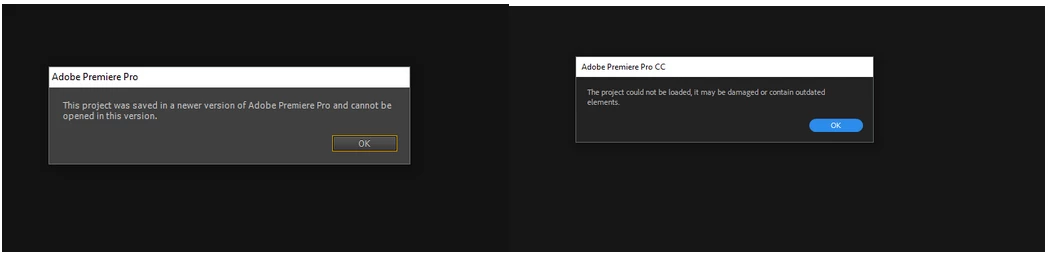
This can't be possible right?

The CC 2017 was automatically uninstalled, how do I get it back?

    This topic has been closed for replies.
    Correct answer Ann Bens

    Just found this myself out: how to install 2017.

    Download Creative Cloud apps

    You dont need any other version installed to be able to use 2018 with previous projects.

    On a side note; when on a very important project you do not upgrade. You can get yourself in serious trouble.

    3 replies

    Tracyofphotography
    Inspiring
    December 9, 2017

    If you use the Adobe Creative Cloud Desktop you should be able to click the down arrow beside "Open" and choose Other Versions and download from there. DK if that's obvious, but hope your projects are working now!

    John T Smith
    Community Expert
    Community Expert
    December 9, 2017

    read https://forums.adobe.com/thread/2413891 for information on previous versions being removed

    -No more Dolby export https://forums.adobe.com/thread/2396890

    valentinb0
    Participating Frequently
    October 19, 2017

    Thank you! This solves my problem of not finding the CC 2017 in the Creative Cloud app.

    Why would that be taken out in the first place?

    I can't open 2 different CC 2017 projects in CC 2018. Should this work? Because at least here it doesn't (as the the right screenshot in the original post shows).

    I know of the issues with upgrading, but was assuming that I can anyway switch back to CC 2017 and that would take 10 mins. The problem was the removal of it from the Creative Cloud App, which you solved for me providing the links.

    Thanks

    Inspiring
    October 19, 2017

    Same problem here. CC 2017 non present in the Creative Cloud App. So now they doesn't just release version full of bugs with the excuse that "you can use the previous version", no, they also PUT BUGS with the previous versions installer.

    Well done Adobe, as always!

    Ann Bens
    Community Expert
    Ann BensCommunity ExpertCorrect answer
    Community Expert
    October 19, 2017

    Just found this myself out: how to install 2017.

    Download Creative Cloud apps

    You dont need any other version installed to be able to use 2018 with previous projects.

    On a side note; when on a very important project you do not upgrade. You can get yourself in serious trouble.