
Inspiring
October 21, 2022
Answered

Can't open Premiere Pro b/c of permission issue

  • October 21, 2022
  • 1 reply
  • 1001 views

I'm trying to open Premiere Pro 23 on my MacBook and initially denied access to Documents b/c I didn't see the need for access (very sorry I did this now!). I'm stuck in a loop where it keeps sending me to Preferences to allow access. My preferences DO allow access. I've tried relaunching holding down the option key but it did not help. I rebooted and held down option. Still stuck. Help! 
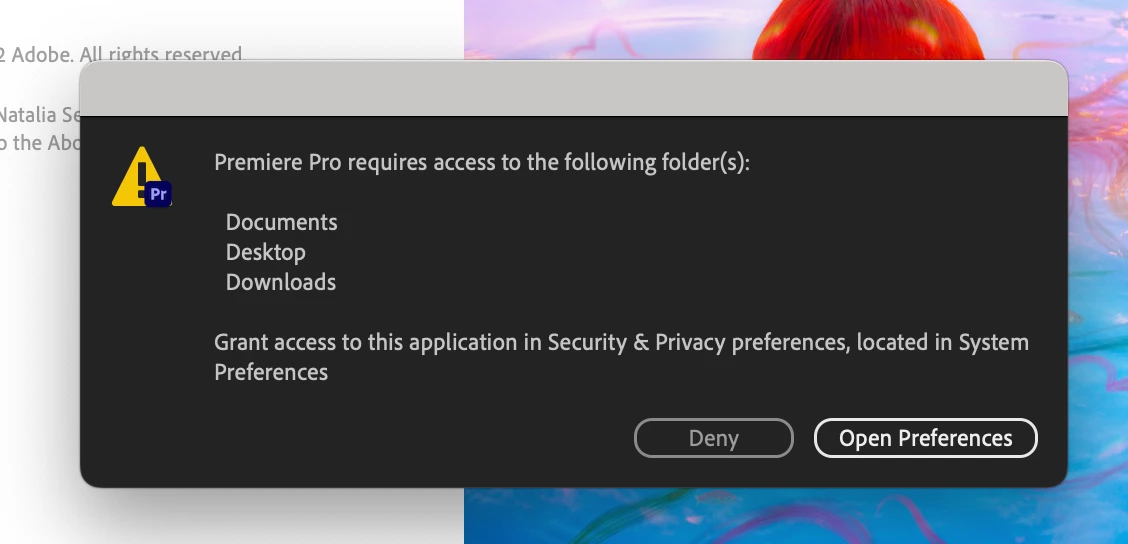
This topic has been closed for replies.
Correct answer joannb23646899

Thank you for helping, Ishan. I've got it working now. I misread the intent of the instruction. I went through accessibility when enabling files and folders (System Preferences > Security & Privacy > Accessibility), I should have gone through privacy (System Preferences > Security > Files & Folders). I found advice here and helped see the error of my ways. Thanks again!


Sorry, that's System Preferences > Accessibility.

1 reply

Ishan Y
Community Manager
Community Manager
October 21, 2022

Hey,


Sorry about the issue. Could you try granting Premiere Pro full disk access? Here's how. Let us know if this helps.


Thanks,

Ishan

Inspiring
October 22, 2022

Thank you for your advice, Ishan. Unfortunately this did not work. I was able to give Premiere Pro full disk access but I get the same error message. I can't seem to clear the startup settings I used the first time I launched yesterday no matter what I do. I've uninstalled, reinstalled, rebooted my computer, double checked permissions - even tried an earlier version of Premiere to no avail. I get the same error. I'm at my wits end.

Ishan Y
Community Manager
Community Manager
October 31, 2022

Sorry to hear about that. Could you create a new user administrator account and try again? Here's how: https://support.apple.com/en-in/guide/mac-help/mtusr001/12.0/mac/12.0