


Inspiring
November 15, 2016
Answered

Can't Open Project Files After 2017 Update

  • November 15, 2016
  • 4 replies
  • 4423 views

After updating to the 2017 version of Premiere Pro, my older project files (created in the 2015.3 version) have lost the file association with Premiere Pro CC in Windows 7 x64. I tried to recreate the association by right-clicking on the file and selecting "Open with." Premiere Pro CC 2017 is not listed in the Recommended Programs section, or in the Other Programs section. So I click the Browse button, navigate to the "Adobe Premiere Pro.exe" in my Program Files folder, and select it as the default program. The problem is, it doesn't update. When I click Ok, it just selects Adobe Acrobat Reader DC instead.

The screenshot below shows that the recommended programs list does not include Premiere Pro.
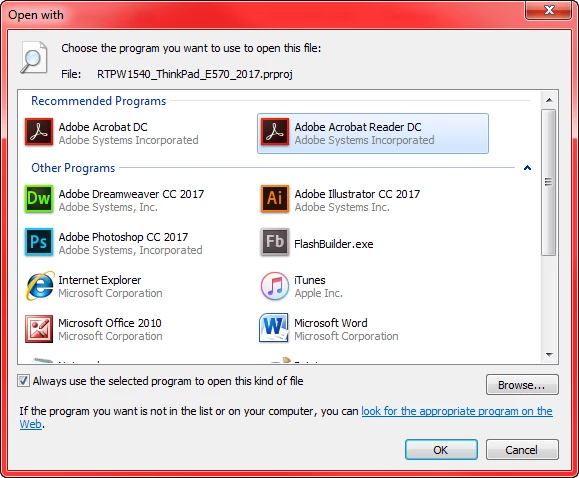
I have restarted and tried to recreate the association multiple times, but I have had no luck.

On a positive note, I can open Premiere Pro, select "Open Project" and navigate to the project file to get it to open that way. The problem is, I have to do it that way every time, even after I convert it to a 2017 version and save it.

Any suggestions?

    This topic has been closed for replies.
    Correct answer Kevin-Monahan

    Hi Mnealonjr,

    I recommend continuing to import your older project into a newer one, as you discovered. It's the better methodology anyway, as it generates fewer anomalies. I'll look  into your case, however.

    Thanks,

    Kevin

    4 replies

    Abambo
    Community Expert
    Community Expert
    November 16, 2016

    You can use the "Browse" button and then navigate to the place, where Premiere Pro is installed. That should normally be this path:

    C:\Program Files\Adobe\Adobe Premiere Pro CC 2017

    Be sure to tick the "Always use..." !

    As you see, I still have the association and it works fine for me. I just tested it.

    You need however to save your old projects under a new name. And new projects won't open (probably) with the old software.

    ABAMBO | Hard- and Software Engineer | Photographer
    tomfnac
    Participant
    November 16, 2016

    Hi, just to let you know I have exactly the same issue. Only with After Effect, since the 2017 update. I have not found other solution than drag and drop the file on the AE desk icon, but that is kinda annoying !

    Thanks

    Legend
    November 15, 2016

    I can open Premiere Pro, select "Open Project" and navigate to the project file to get it to open that way.

    That is the normal method.

    Kevin-Monahan
    Community Manager
    Kevin-MonahanCommunity ManagerCorrect answer
    Community Manager
    November 15, 2016

    Hi Mnealonjr,

    I recommend continuing to import your older project into a newer one, as you discovered. It's the better methodology anyway, as it generates fewer anomalies. I'll look  into your case, however.

    Thanks,

    Kevin

    Kevin Monahan - Sr. Community & Engagement Strategist – Pro Video and Audio
    Participant
    November 16, 2016

    Hi Kevin,

    I had the same issue in Windows 7 / CC 2017. I fixed it by removing the .prproj file association in the registry ( pay attention to what you are doing and don't delete stuffs your system needs):

    Go to the registry and delete the .prproj subkeys in:

    HKEY_CURRENT_USER\Software\Microsoft\Windows\CurrentVersion\Explorer\FileExts

    HKEY_CLASSES_ROOT

    If you consider that this could be a solution for most of the user, feel free to use it.

    Cheers