

Can't pan audio clips anymore
In the past, I used to be able to pan an individual audio clip so it was coming out the left or right speaker. It's very handy when a person or animal walks past the camera on a certain side. But now, it's not working for me anymore. I'm probably doing something wrong at a very basic level, but can't work out the solution myself, so any advice would be welcomed.
So, I used to go into the Panner in the effects control panel, and take it to 100 if I wanted the audio purely from the right speaker, or -100 if I wanted it purely from the left. Or keyframe it to ramp from centre to left/right, depending on the situation.
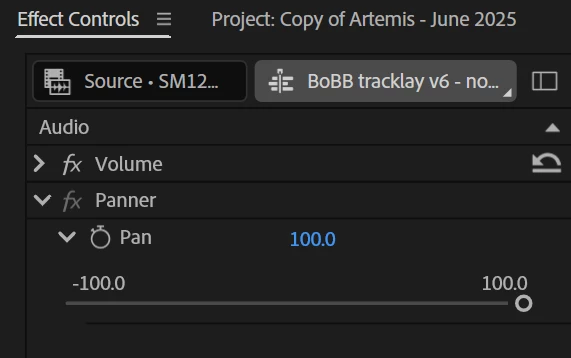
Now, the audio comes out both speakers equally no matter where the slider is set.
The audio track type is 'Standard' though I've tried on 'Adaptive' and it's the same. The panner disappears from the Effects Control panel in Mono tracks, and I'm not working in 5.1.
When I inspect the audio channels of the clip, it shows it being mono with just one channel (below).
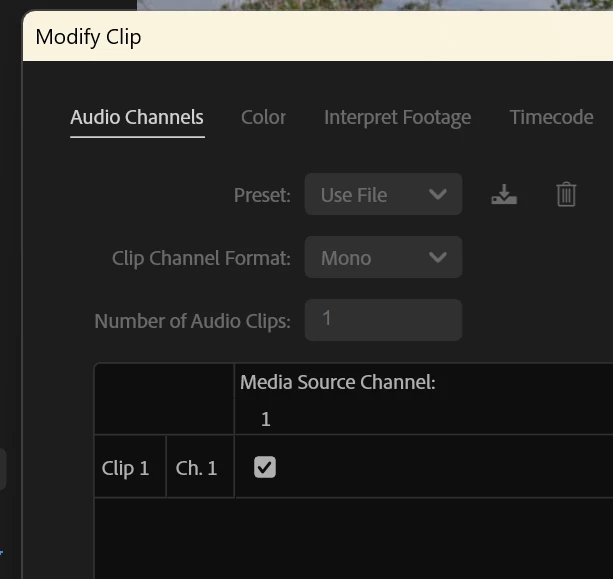
It's not that I want to pan a stereo clip so I'm just hearing the left side of it. I'm trying to shunt all the audio into the left speaker. I know I used to be able to do this! But how, now?
(Note, I'm not talking about panning entire audio tracks in the audio mixer, just within a single clip in the effects control).


 AdChoices