


Inspiring
September 3, 2025
Answered

can't rename audio track

  • September 3, 2025
  • 1 reply
  • 253 views

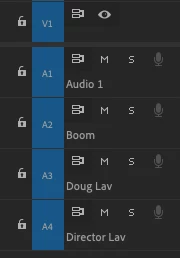
In a Production I'm working on at work, I'm unable to rename audio track A1 in some sequences. I'm able to rename all the other tracks, but when I type a name into A1, it reverts back to "Audio 1":

Correct answer PaulMurphy

You’re actually using the Mix track all the time—that’s the track that all other audio tracks are routed to. (It used to be called the Master track.)

If you're trying to rename a track for clarity or organization, a good alternative name could be "Mixdown".

1 reply

Mike Dziennik
Community Expert
Community Expert
September 3, 2025

What happens if you delete the track and then re-add it again. Can you rename it afterwards?

KazuTaAuthor
Inspiring
September 3, 2025

It seems like I can name it anything other than "Mix". I guess that's because there's a "Mix" track at the bottom (that I never use)? I renamed it "Mix track", that worked ("On set mix" might be more precise).

PaulMurphyCommunity ExpertCorrect answer
Community Expert
September 4, 2025

You’re actually using the Mix track all the time—that’s the track that all other audio tracks are routed to. (It used to be called the Master track.)

If you're trying to rename a track for clarity or organization, a good alternative name could be "Mixdown".