

Inspiring
February 5, 2025
Answered

Can't save Caption Style in 25.1

  • February 5, 2025
  • 9 replies
  • 1821 views

The option to save caption style is not available. No option to save once I have set the captions to appear how I want them.


MacOS 14.6

Premiere Pro 25.1
Correct answer pauld5937403

Crap...So easy and yet so difficult. Thanks for your help

9 replies

Community Manager
February 5, 2025

All good.  Glad we could figure it out.  Good luck with the rest of the project.

Stan Jones
Community Expert
Community Expert
February 7, 2025

@pauld5937403 @Rach McIntire 


This change to the Properties panel has resulted in users thinking that multiple controls were missing. I think this is a bug, because some of the controls (font size numerical entry) could easily scale with the panel, and disappears with minimal reduction from the default. In any event, there has been no response to any of these posts (all were discussions or ideas) other than forum staff noting them.


I am not sure which team should address. I posted about this in the Beta forum in the thread regarding the changes/introduction of the Properties panel.

https://community.adobe.com/t5/premiere-pro-beta-discussions/now-in-beta-properties-panel-for-premiere-pro/m-p/15030214#M10810


@Abhi Singh Principal PM @AnnikaKoenig 


The general case is that you cannot reduce the width of the Properties panel (for Text) by very much at all without losing controls.

https://community.adobe.com/t5/premiere-pro-ideas/enable-graphics-properties-panel-to-have-dynamic-resizing/idi-p/15087942


The current thread is the first mention I've seen of it being the Style Browser entry icon.


The main complaint has been the numerical entry option for font size.

https://community.adobe.com/t5/premiere-pro-ideas/revert-font-size-settings-to-original-in-version-25-1/idi-p/15029282

https://community.adobe.com/t5/premiere-pro-discussions/no-numerical-values-for-text-size/td-p/15030956


And the various wrench icons in this panel disappear. (I don't have a link for one of those examples.)


This one was merged (perhaps incorrectly) with one of the others - it is about text entry box for mogrts no longer scaling/wrapping so you can see all the text. It may be related re width of the panel, but I cannot test at the moment.

https://community.adobe.com/t5/premiere-pro-discussions/no-numerical-values-for-text-size/m-p/15025115#M542941


Stan


Adobe Employee
February 11, 2025

Great job advocating for usability issues @Stan Jones ! And thank you so much for listing all the complaints. We are looking into some improvements...

pauld5937403AuthorCorrect answer
Inspiring
February 5, 2025

Crap...So easy and yet so difficult. Thanks for your help

Participant
August 6, 2025

Had the exact same problem and it took me forever. You can't tell the GUI is expandable with the way the scroll bar currently is set up.


Community Manager
February 5, 2025

If you grab the right hand side of the GUI can you pull it out wider?  There should be the Style browse option if you pull it out.

Inspiring
February 5, 2025

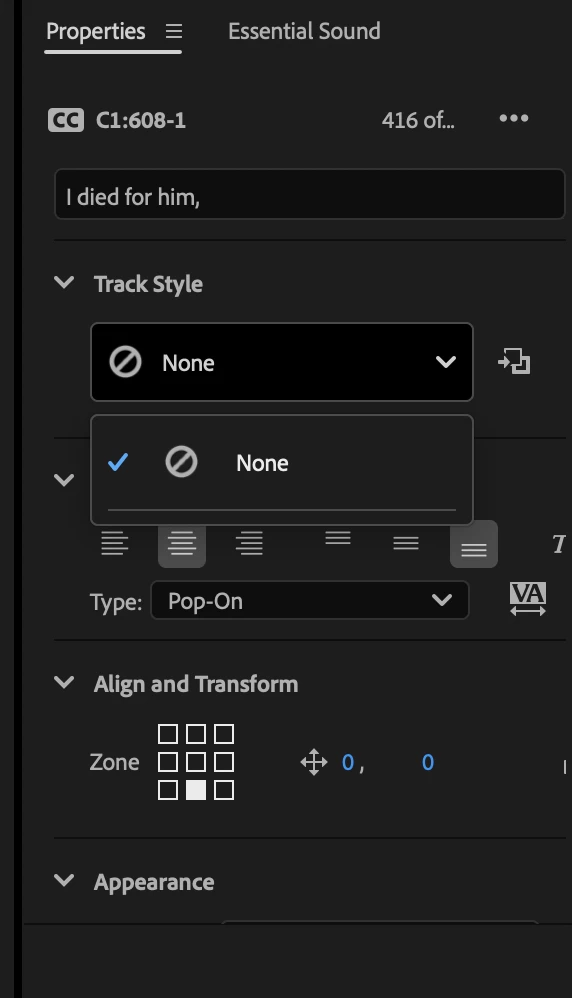
I've done it both ways...Selected all the captions and just one as pictured here. I am in the Captions properties panel and there are very few formatting options in this properties panel unlike when I simply make a text object. But I see no option to save a style anywhere. All I want to do is save the caption with an opaque black background and change the font to Arial.


Community Manager
February 5, 2025

Hmm...  It looks like you have mutiple captions selected.  If you select just one does it give you that option?  Are you in the Captions and Graphics Workspace or a different one?

Inspiring
February 5, 2025

I don't see that option in the properties panel and I don't see a separate styles panel.

Here's a picture of the whole panel. Sorry, not new to this workflow but something has changed.


Community Manager
February 5, 2025

If you click on the File Browser in my first graphic and then hit the +, you can save the style.  Are you saying you don't have that option?  

Inspiring
February 5, 2025

I used to have one style that I saved available but it doesn't show up under the new version of PrPro and it doesn't give me the option to save a style in the properties panel

Community Manager
February 5, 2025

Hi @pauld5937403 ,


Welcome to the Premiere Pro forums! We are glad to see you here.


Do you have any styles saved already?  If you click the style browser, it gives you the option to save a new style,  and then you should have options created.


Let me know if that solves it.
