Participant
January 7, 2020
Answered

Can't see where I'm dragging clips in timeline

  • January 7, 2020
  • 9 replies
  • 4868 views

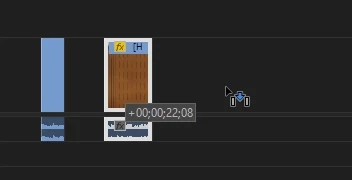
Hey everyone, having a bit of trouble: I can't see where I'm dragging clips in my timeline. I'm still able to move stuff around, but I'm not showed a transparent version of the clip under my mouse to show which track/where exactly it will be when I let go. I think I accidentally hit a hotkey and turned this on/off whilst editing but I don't know what I hit. It looks like the attached picture when I'm dragging. Thank you for any help you can provide 🙂

.
This topic has been closed for replies.
Correct answer Ann Bens

Nested audio can cause issues.

9 replies

Participating Frequently
June 3, 2022

This is an old threat and seems still mostly unresolved. I've been having this very issue since I upgraded my project to PP2019 v13.1.15 (I know, I'm still behind, but worry my processor can't handle the latest version). It's only doing it in some of my sequences, not in all, but those where it does it don't have any nested audio, so that's not the culprit in my case. Has anybody else figured out how to trouble shoot this? Really impossible to work like this when you can't see where you're moving clips to in the timeline....

Inspiring
August 22, 2021

I fixed it by clicking on my nested sequence and deleting the audio inside, then I was able to see the clip when dragging. I had an identical problem

Kombi Life
Inspiring
July 8, 2021

BUMP: I'm also seeing this on a brand new machine. It's annoying to work with when you can't see where you are dragging the clip

frmchi
Participant
June 3, 2021

Feels like this problem began this year 😕😕 I just started having the same issue.


JBCM Media Production
Participating Frequently
May 25, 2021

This has happened to me multiple times. Today it has seemed to be caused by bringing in an edited sequence that just has audio and no video. When I delete the clip the problem goes away.

If I bring the audio clips without being nested the problem doesn't appear.

If I nest the audio clips from within the sequence the proble reappears


Ann Bens
Community Expert
Ann BensCommunity ExpertCorrect answer
Community Expert
May 26, 2021

Nested audio can cause issues.

lpryce
Participant
July 9, 2021

This is what it was for me, thanks for this!

enricoluzi
Participating Frequently
May 3, 2021

Is this a one year old topic without solution? This started also for me yesterday with no reason whatsoever. Disabling audio waveforms worked, but it's not a solution! 

nathant43632279
Participant
April 27, 2021

I'm having the same problem.  I can't figure it out...

Participant
April 27, 2021

I posted my findings above, hope they can help :< Nothing too concrete, sadly.

Participant
April 22, 2021

I'm having the same exact issue. Very frustrating.


Participant
April 22, 2021

Let me know if you found a solution!

Participant
April 27, 2021

I never found a solution, and its happened a few times since on different projects. Previously I've just rendered out my project so far and used it for the basis of a new project (as the projects get bigger and more ungainly, this seems to trigger such issues more often, so starting 'fresh' like this usually fixes the problem)


From what I can tell it seems to be certain files I'm importing that cause some weird errors - most recently I had this on a project a few days ago. I'd just imported + nested a clip so I tried removing that new clip and it seemed to fix the problem. That's just a workaround sadly, and I don't know if its results can be replicated with your own issues. Apologies!

Inspiring
January 7, 2020

looks like you should select the arrow ( pointer) tool... instead of replace or insert tool ???