Participant
November 27, 2019
Answered

Can you help me with graphics issues?

  • November 27, 2019
  • 1 reply
  • 543 views

I use the translator to upload my posts.
So my English will not be good.


(I typed in hard, but it gets upset many times.
I sincerely hope someone can help me)


I have a problem with Adobe Premiere Pro.
I am using NIVIDIA gtx 1060 as external graphics.
However, the program recognizes it as internal graphics, not NIVIDIA graphics.
How can I recognize this program as an external graphic?


This topic has been closed for replies.
Correct answer ha_neul2

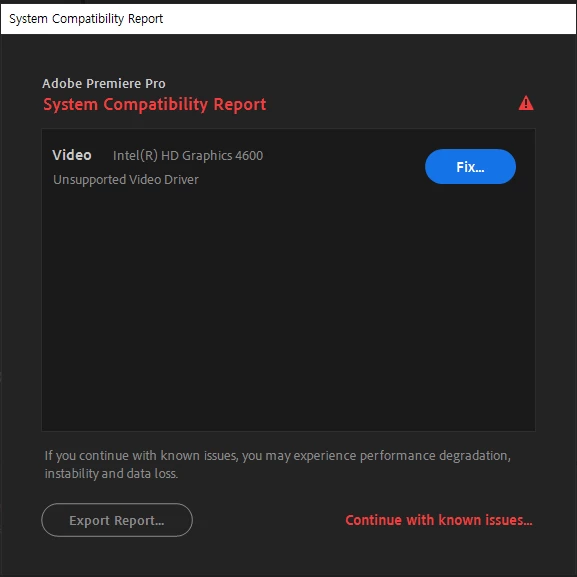
Try installing that driver for your Intel GPU.

However, please also understand that when encoding H.264 or HEVC, you actually want to use the HD Graphics card, not the NVIDIA because of advantages from Quick Sync.

For ProRes, or the like, you might need that NVIDIA card more and Quick Sync won't help accelerate your export. 

I hope that makes sense.


[인텔 GPU에 해당 드라이버를 설치하십시오.

그러나 H.264 또는 HEVC를 인코딩 할 때는 Quick Sync의 장점 때문에 실제로 NVIDIA가 아닌 HD 그래픽 카드를 사용하고자합니다.

ProRes 등의 경우 NVIDIA 카드를 더 필요로하고 Quick Sync는 내보내기 속도를 높이는 데 도움이되지 않습니다.

나는 그것이 의미가 있기를 바랍니다.]


My computer specs were not suitable for Adobe Premiere Pro.

(찾아보니 제 컴퓨터 사양이 Adobe Premiere Pro에 적합하지 않았습니다.)


Your answer has really helped me!

(당신의 답변은 제게 정말로 큰 도움이 되었어요!)


Thank you very much!

(정말 감사합니다!)


I was surprised to answer latetime.

(그리고 저는 늦은 시간에 답변 주시는 것에 대하여 놀랐습니다.)


Thank you and thank you again

(감사하고 또 감사합니다.)
1 reply

Kevin J. Monahan Jr.
Legend
November 27, 2019

대써,

"수정"버튼을 클릭하면 어떻게됩니까?

[What happens when you click the "Fix" button?]


고맙습니다,

Kevin


[기계 번역을 실례합니다]

Kevin Monahan - Sr. Community and Engagement Strategist – Adobe Pro Video and Audio
Kevin J. Monahan Jr.
Legend
November 27, 2019

당신을위한 더 많은 정보.


NVIDIA GPU를 사용하려면 비디오 패널의 내보내기 설정 대화 상자 및 환경 설정> 미디어> 하드웨어 가속 디코딩 활성화 ( "다시 시작해야 함")에서 "하드웨어 가속"을 비활성화하십시오.

이 설정을 ON 위치로두면 Quick Sync 기술을 통해 H.264 및 HEVC 코덱의 하드웨어 가속 디코딩 및 인코딩이 가능합니다. 이를 통해 이러한 코덱을보다 빠르게 처리 할 수 있습니다. 다른 코덱의 경우 설정을 OFF로 전환 할 수 있습니다.


이 추가 정보가 도움이되기를 바랍니다.

Kevin Monahan - Sr. Community and Engagement Strategist – Adobe Pro Video and Audio
ha_neul2Author
Participant
November 27, 2019

In addition, I thought using only external graphics would not cause the rack to hang when using this program.

(게다가 저는 어도비 프리미어 프로를 이용할때, 생기는 렉이 내장그래픽 때문이라고 생각했습니다.)


I thought that activating only external graphics would not delay the program.
(그래서 저는 외부 그래픽만 활성화해도 프로그램 지연이 생기지 않는다고 생각했습니다.)


Thank you for your kind reply in my post!

(제 게시글에 친절하게 답변 주셔서 감사합니다!)