
Known Participant
May 8, 2023
Answered

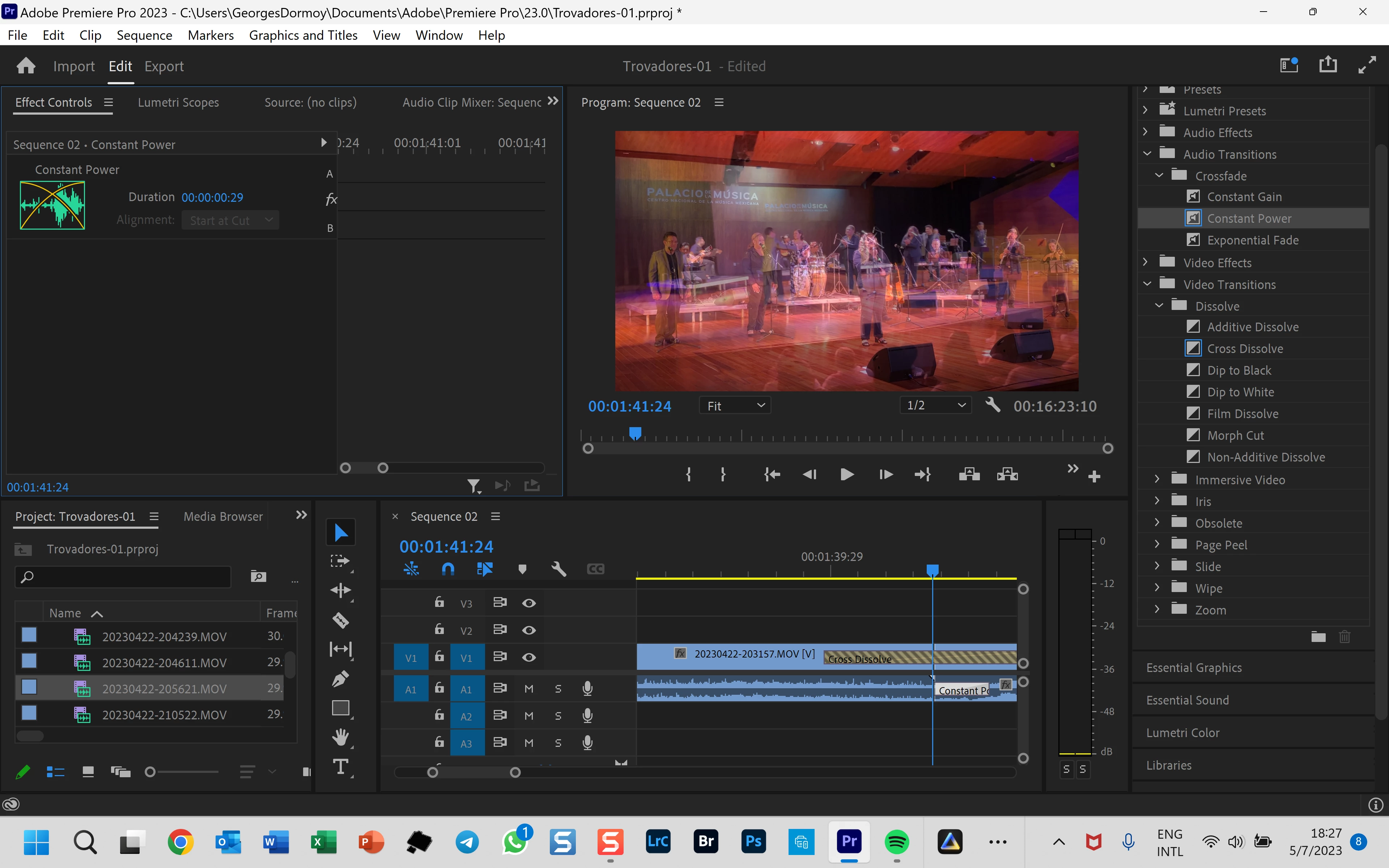
Cannot center audio transition

  • May 8, 2023
  • 1 reply
  • 1953 views

When I choose to use an audio transition (whether Constant Gain or Constant Power), by default, Premiere put the transition either at the end of the left clip or at the begening of the right clip.  In the past I had the option of putting the transition in center (covering both clips).  But for an unknown reason, I no longer have this possibility.  The drop down menu to select "at center" is greyed and not active (see my screen capture attached).  I uninstalled and reinstalled Premier Pro, then I got back for the first file opening this option, and then, again, it disappereard!!

Can someone help me to recuperate that function.  Also in the preference, is there a place where I can determine by defult that the transition should be centered between the 2 clips ?  It works well for the video but not in audio.
1 reply

Inspiring
May 8, 2023

You don't have enough media to properly center the transition over both of your clips. Either your left or right clip is too short and there's nothing to transition with. In fact, your video transition isn't doing what you think it is either, that's what those "danger stripes" on the transition mean. 

If you have a 30 frame video transition then you need 30 frames of footage to to cover. If it's center-aligned this means 15 frames after the end of your first clip and 15 frames before the beginning of your second clip.


To visualize this better, duplicate your audio and video clips above and below your current one clips so it looks like this:

V3: Clip 2 (on the right of the transition)

V2: Clip 1 (on the left of the transition)

V1: Current clips with transitions

A1: Current clips with transitions

A2: Clip 1

A3: Clip 2


Now on tracks A/V 2 & 3 extend your edits as far as they'll go. One or both of them either won't be able to extend or they will only be able to extend a little. This will help you visualize what the transition on v1 is doing, which isn't much.

fdormoyAuthor
Known Participant
May 15, 2023

Thanks for your comments.  But each clip lasts about 4-5 minutes, and not just 30 frames.

But yes, I often get this message saying not enough frames to make the transition.  

If I need 30 frames in each side of the 2 clips and each one has 9,000 frames (5 minutes duration), then I do not understand what is the definition of frame for which Prepimere Pro says I have less than 30 frames.

Can you clarify ?

Ann Bens
Community Expert
Ann BensCommunity ExpertCorrect answer
Community Expert
May 15, 2023