
Participating Frequently
October 31, 2017
Question

Cannot create working multicam sequence from Prelude rough cuts

  • October 31, 2017
  • 4 replies
  • 1382 views

I have some two-camera footage shot from two identical Sony cameras that break the video up into 10-minute MTS files.  (I wasn't given the original SD card images from which I could have acquired them pre-stitched together - c'est la vie)

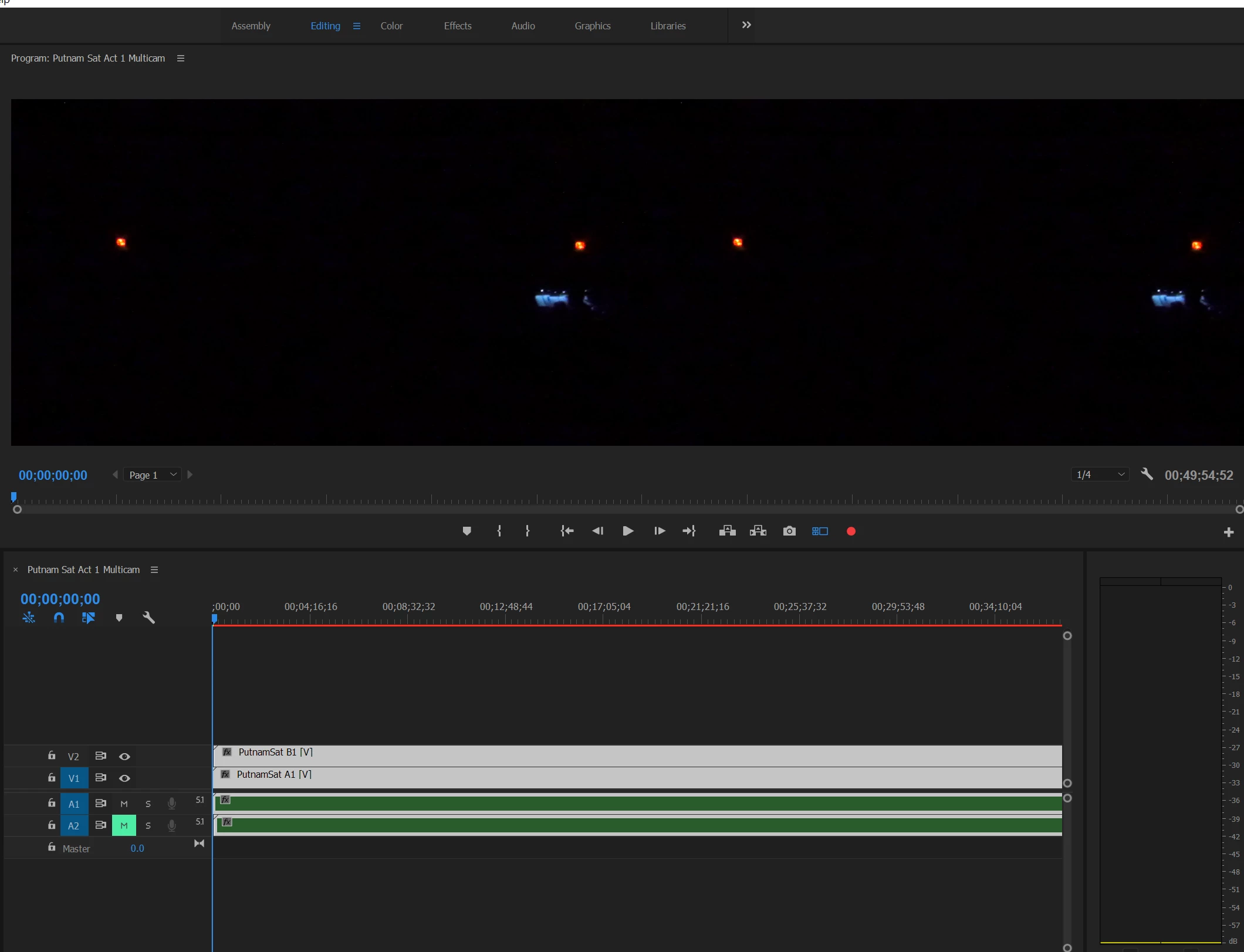
I used Prelude to stitch them together into separate rough cuts per camera and sent the rough cuts to Premiere (v11).  I then attempted to create a multi-camera sequence from the two rough cut sequences.   It all seems to work, but....  instead of the typical multicam sequence with a single V1 track, Premiere ends up giving me a sequence that has two video tracks - and the multicam view in the Program Monitor only shows one angle.

Any idea how to fix this?
    This topic has been closed for replies.

    4 replies

    Participating Frequently
    November 3, 2017

    Well, exporting the rough cuts to DNxHD from Premiere didn't work any better.  Create Multicam is still giving me a sequence with two video tracks and only one angle in the multicam view of the Program Monitor.     I'm anticipating Adobe tech support's inevitable request and running the Creative Cloud update to the next major version of Pr.    Create Multicam works in another project.  I think it hates this show as much as I'm beginning to.  Serves me right to do a comp gig, LOL.

    Is there a way to create and sync up a multicam sequence manually?  I haven't found one.

    Participating Frequently
    November 3, 2017

    Well that was a complete and utter failure. https://forums.adobe.com/thread/2396919

    Attempting to reinstall Dolby Digital CODECS after Premiere Pro 2018 blew them away... 

    Participating Frequently
    November 3, 2017

    Reinstalling the Adobe Media Encoder 2017 made the Dolby Digital CODECs available again, but it still doesn't work.   Now that I have DNxHD versions of the footage, that means another NLE will work, so I have a Plan B. (evil LOL)  I'll report what Adobe support comes up with.

    Participating Frequently
    November 1, 2017

    Ran into disk space issues doing that.   It's over two hours of live theatre shot in 2 angles at 60p HD.  Any other ideas other than going to a more lossy CODEC or upgrading the HDD?

    Legend
    November 1, 2017

    Editing requires lots of hard drive space.  It's best to accommodate that.

    4TB and higher, Desktop Internal Hard Drives, Hard Drives, Components - Newegg.com

    Participating Frequently
    November 2, 2017

    Agreed. And I've already got 8TB.  This is a spec job for a nonprofit.  Don't want to compromise paying gigs in flight.  I too an on deck project offline to accommodate. 

    Opening a Support case with Adobe because this really should work.

    Legend
    October 31, 2017

    Add all the clips from one camera to a sequence in Premiere Pro.  Export as a new Cineform file.  Do that for both cameras, then start a new project with the new files.

    Inspiring
    October 31, 2017

    If you move the playhead later in the timeline, the problem remains?

    MtD

    Participating Frequently
    October 31, 2017

    Yes.  positioning the playhead where they overlap still only shows one angle in multicam view.