
Inspiring
March 7, 2018
Answered

Cannot import video from H.264 or JPG images

  • March 7, 2018
  • 1 reply
  • 1906 views

I started a simple project,editing me still images and short video clips taken with a Cannon Rebel T7i camera.  Everything was working wonderfully on day 1.  Day 2 I open the project and no visuals appear.  I tried creating a new project and re-importing my assets, still no visuals.  The audio from the video is imported, but I do not see picture.  This is true with the still images, no picture.  Here is what the video looks like on the timeline:  I've tried exporting with new encoding using Media Encoder as many of the discussions suggested.  Still no joy.  I thought maybe the settings got screwed up, but I seem to be okay there.  Any suggestions?
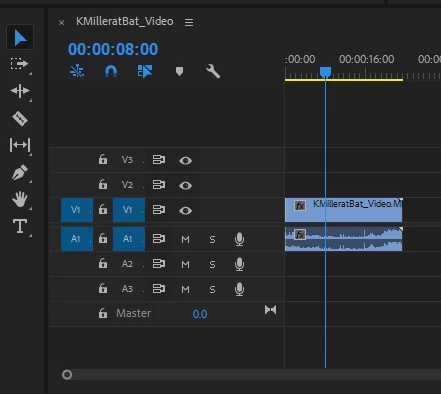
    This topic has been closed for replies.
    Correct answer excited_Genie16B8

    I have tried all of the above ways to solve the problem with my Premiere Pro CC (2018).  I've installed new drivers, restarted my machine, uninstalled the app, reinstalled the app (after new drivers were installed), tried all these variations:

    3D - We are self-hosted and any security software is institute wide, not on specific machines.  No way LAN will remove

    2N - Don't have QuickTime on the machine

    3A - Updated drivers

    2M - CUDA turned off

    2F - Reset Premiere Pro - tried this too

    2K - Not an option here, I've got the only machine that can handle this (we are a non-public special education school)

    3E - Restarted several times

    Funny thing is that the exact same video and images play just fine in Premiere Pro CC (2017).  It's a mystery, but I'm not going to update so I can actually work.  Any other options are greatly appreciated and thanks for all the help already given.


    I have tried all of the above ways

    Well, not all of them.  There's a reason 3D exists.

    I would also recommend using a clean install of Windows 10.  Windows 7 doesn't fully support Premiere Pro 2018 and beyond.

    1 reply

    Legend
    March 7, 2018

    What happens if you load the clips into the Source Monitor?  What happens if you create a Bars & Tone clip?

    Inspiring
    March 7, 2018

    When I load the clip into the source monitor, I get audio but no video on the H.264 and no image on the jpg.  When I switch to icon view, I see the video but it goes black when I try to play it.  Same with bars and tone.  I get tone, but cannot see bars, but see them in icon view i my Project list

    anissa_thompson
    Community Expert
    Community Expert
    March 7, 2018

    Can you confirm that the images and video are still available and viewable in the source folder you originally setup when you imported them? I've had issues reconnecting to content on external drives and cloud-connected local storage... someplace to start checking.

    Hope this helps! Make sure to press "✔ Correct Answer" on this post if this answers your question. Happy Creating!Anissa • @anissat