
willywater88
Participant
March 31, 2019
Question

Cannot remove caption background, no text size option.

  • March 31, 2019
  • 4 replies
  • 17974 views

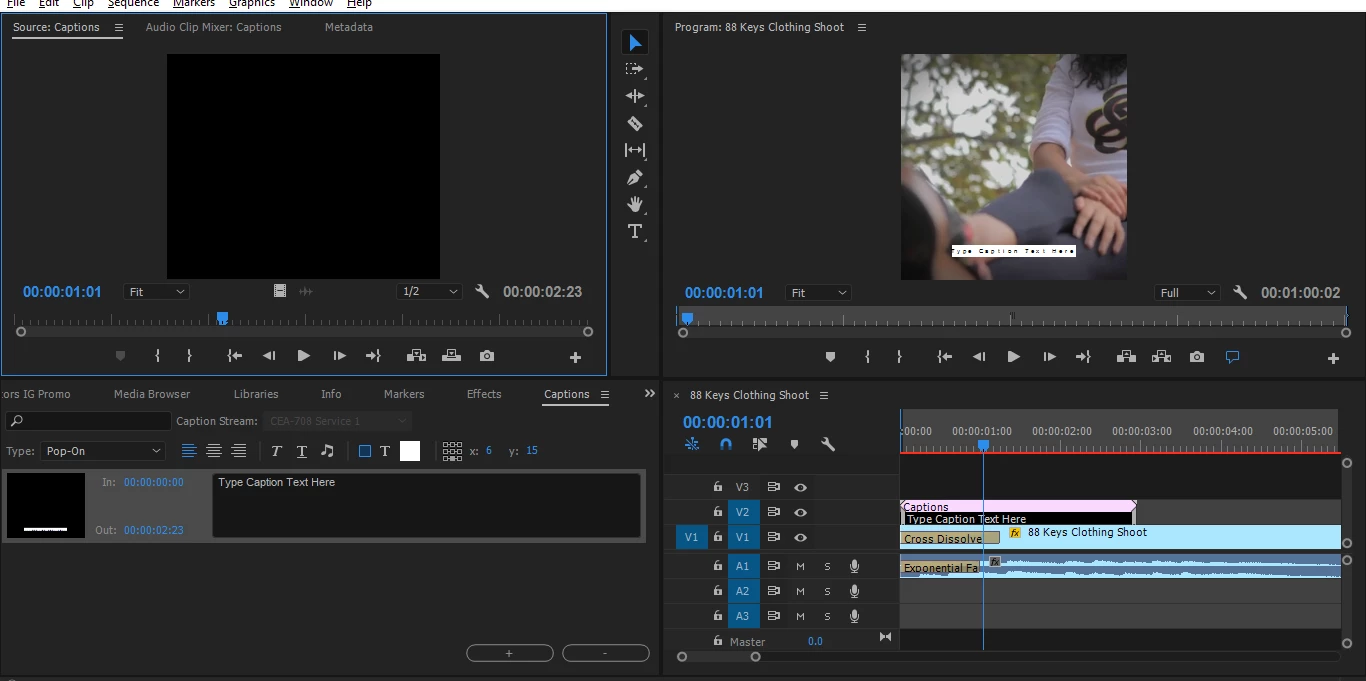
I am trying to remove the background color for the caption and I see an option for "transparent" but every time I click that, the window menu closes and does nothing. I also do not see an option to change text size. Did I close something by mistake?
    This topic has been closed for replies.

    4 replies

    ben_ten
    Participant
    May 16, 2023

    i hope you still here, i have found a loop around,

    i have just changed the white background for green and than use special effect to remove the green color from the layer

    if you need any help hit me up

    frontPhotography
    Participant
    April 27, 2020

    Fixed!

    in Captions tab, bottom of tab has Import settings. Change Background opacity to 0% and the BG will not show.

    devolskii
    Participating Frequently
    January 7, 2021

    Where is this captions tab? Can you post a screenshot with it marked?

    Stan Jones
    Community Expert
    Community Expert
    January 7, 2021

    Just double click a caption stream in your timeline. Even if the Caption Panel is closed, it will open.


    Below is an image that shows one way it may appear in the Project Panel group. But it may not be open. Just use the "Window" file option at the top of the PR app and pick "Captions." It will open the panel or display it if it is already open.


    Stan


    @mj
    Community Expert
    Community Expert
    March 31, 2019

    Closed captions have limited styling possibilities.

    Could open captions work for you?

    Deep Dive: Working with Open Captions (Subtitles) | Adobe Blog

    willywater88
    Participant
    March 31, 2019

    I first attempted to use open captions but I was unable to drag the new item into my timeline, I can only drag a closed caption into the timeline. Any idea what causes this?

    Stan Jones
    Community Expert
    Community Expert
    March 31, 2019

    You should be able to add Open Captions. Post a screen shot of the caption stream in the Caption Panel.

    Stan Jones
    Community Expert
    Community Expert
    March 31, 2019

    You have a 708 Closed Caption stream which does not allow specifying font or font size, just color. I think this is because users set this for their playback device.

    There is a bug with setting transparency for closed captions.