
Participant
November 1, 2025
Answered

cannot use premiere pro while signed

  • November 1, 2025
  • 4 replies
  • 187 views

I have used premiere pro before, but this is my first time paying for it. For some strange reason my adobe preimere pro won't allow me to edit videos, for example I can't drag down a picture or my sound audio to the editing table. Can someone help me fix this problem?


Kind Regards

Harry 
Correct answer Averdahl

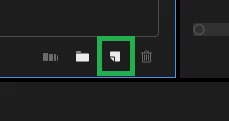
You have no timeline and thats why it wont work. Drag the video to the New Item icon down right in the Project panel. (See the attached image) This wil automatically create a new timeline based on the video clip. If your clip is 1920x1080 25 fps the timeline will be 1920x1080 25 fps as well.


Or, go to File > New > Sequence and create a new timeline.


quote

...for example I can't drag down a picture or my sound audio to the editing table


By @social_genius8682

4 replies

Ann Bens
Community Expert
Community Expert
November 9, 2025

You are trying to drag a clip into the audio meter.............

Stan Jones
Community Expert
Community Expert
November 1, 2025

@social_genius8682,


@Averdahl's method will get you back to working most efficiently.


Normally, you can do what you are trying: drag an asset to the empty timeline area/panel, and it will create a sequence in the timeline. But your entire timeline panel is closed, and the big black area where the timeline panel should be is the stretched-out Audio Meters panel. When you do what @Averdahl says, it will also open the timeline panel with your new sequence in it.


As @MyerPj says, when your workspace (the entire screen of panels etc) gets messed up, select a new one, or reset the current workspace to its normal state: Windows -> Workspaces-> Reset to saved layout.


Stan


Averdahl
Community Expert
AverdahlCommunity ExpertCorrect answer
Community Expert
November 1, 2025

You have no timeline and thats why it wont work. Drag the video to the New Item icon down right in the Project panel. (See the attached image) This wil automatically create a new timeline based on the video clip. If your clip is 1920x1080 25 fps the timeline will be 1920x1080 25 fps as well.


Or, go to File > New > Sequence and create a new timeline.


quote

...for example I can't drag down a picture or my sound audio to the editing table


By @social_genius8682
Participant
November 9, 2025

It works, thank you 🙂

MyerPj
Community Expert
Community Expert
November 1, 2025

Go into Windows/Workspaces and select for instance the Edit Workspace, and then again make sure you have it set to it's default state. Is the video you uploaded really in 480p only. I can't see a tab (panel title) in the stretched out bit you can't drop into.