


cant export in hardware encoding
Hi everyone,
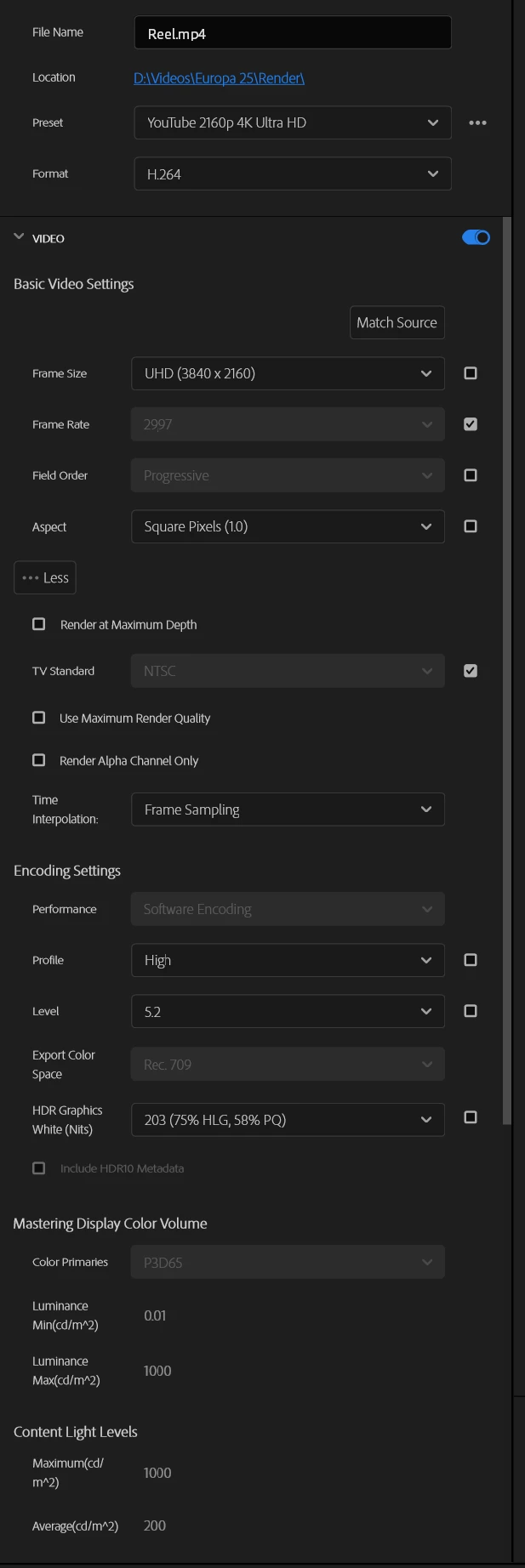
I'm having a persistent issue where Hardware Encoding is grayed out (stuck on Software Encoding) during export, despite having a high-end system and compatible settings.
The Problem: No matter which format I choose (H.264 or HEVC), the "Performance" dropdown remains locked in "Software Encoding". I am working with 4K
10-bit D-Log footage from a DJI Osmo Pocket 3.
My Setup:
-
CPU: Intel(R) Core(TM) i9-14900K (3.20 GHz)
-
GPU: NVIDIA GeForce RTX 4070 Ti (Drivers: NVIDIA Studio Driver - Latest version).
-
OS: Windows 11.
-
Software: Adobe Premiere Pro 2026 (v26.x) or 2025.
Settings Checked:
-
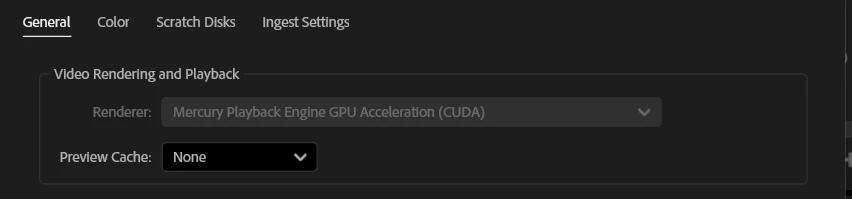
Project Settings: Mercury Playback Engine GPU Acceleration (CUDA) is Enabled.
-
Preferences: "H.264/HEVC hardware accelerated encoding/decoding" are both Checked in the Media tab.
-
Export Settings:
-
Tried HEVC (H.265) with Main 10 profile (for 10-bit D-Log).
-
Tried H.264 with Main profile (8-bit) to rule out bit-depth issues.
-
Toggled "Render at Maximum Depth" and "Use Maximum Render Quality" ON/OFF.
-
Changed Levels (from 5.1 to 5.0/5.2).
-
Changed Color Space (Rec. 709).
-
Additional Notes:
-
I’ve already performed a clean install of the Studio Drivers.
-
The issue persists even when creating a fresh sequence and copying the clips.
-
The "Hardware Encoding" option is simply not available/selectable.
Is there a known compatibility issue between the 2026 version and the RTX 40-series NVENC for specific 10-bit containers? Any help would be appreciated.
 AdChoices