


Participant
Jan 4, 2017 12:42 AM UTC
Answered

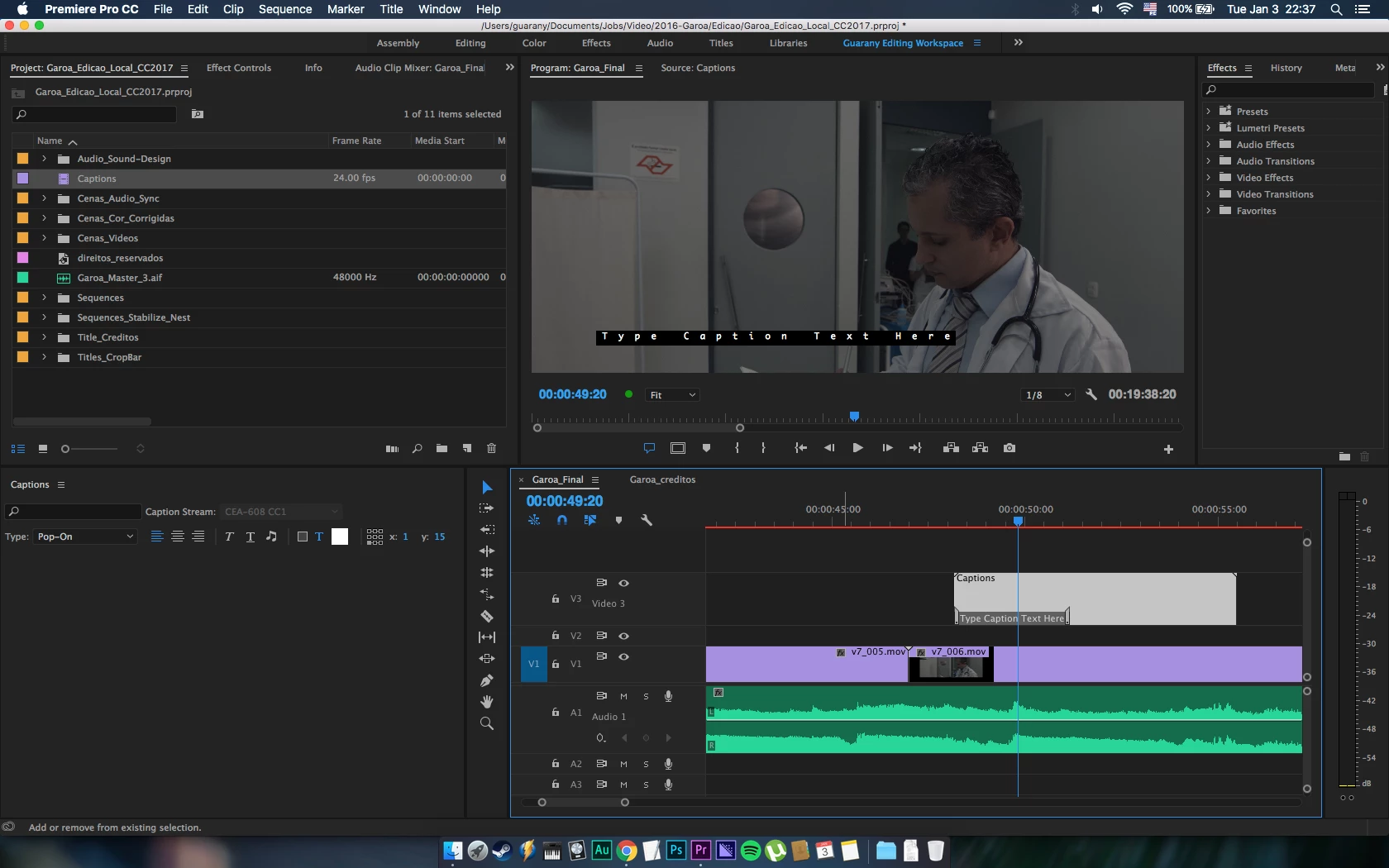
Caption window doesn't have editor options

Hi,

This is the first time I'm trying to simplify my work, using the captions tools, so I can use to make a CC, OC and a SRT.
Tee point is, that my caption window doesn't show up any editor tool, see screenshot to clarify.

Thanks in advance...
GabrielGuaranyCorrect answer
Participant
Jan 4, 2017 1:56 PM UTC

Hi,

Thanks, the solution it was almost like your options.

I opened a new project and the caption window was Ok, so when I got back all was fine. I have no idea what could be, but now it's fine.

9 replies

Ann Bens
Community Expert
Community Expert
Jan 4, 2017 1:40 PM UTC

Pick one of the standard workspaces and Reset to Saved Layout.

Try again.

Translate
Participant
Jan 4, 2017 1:57 PM UTC

I did that before. I think it was something with initialization, I don't know. But now it's working fine.

Thanks a lot

Translate
Vidya Sagar
Participating Frequently
Jan 4, 2017 7:00 AM UTC

Hi Gabrielguarany,

Just for test, create a new caption file & check the captions panel to edit.

If issue persists, change the workspace to Editing & check.

If issue persists,

Go to the following location in the machine

    In Mac, Documents > Adobe > Premiere Pro > 11.0

     Rename the 11.0 folder to Old_11.0

     Launch Premiere Pro, Create a new project(do not open Old projects)

     In Menu bar, Window > Workspace > Uncheck Import Workspace from Projects.

     Open the old project & check the issue.

Please let us know the status of the issue.

Thanks,

Vidya Sagar.

Translate
GabrielGuaranyAuthorCorrect answer
Participant
Jan 4, 2017 1:56 PM UTC

Hi,

Thanks, the solution it was almost like your options.

I opened a new project and the caption window was Ok, so when I got back all was fine. I have no idea what could be, but now it's fine.

Translate
Participant
Jan 17, 2025 8:27 PM UTC

Yeah, this doesn't work.

Translate