Participant
August 5, 2019
Answered

Captions are not centred after increasing font size

  • August 5, 2019
  • 1 reply
  • 774 views

Hi there,

when I'm trying to increase the font size of my captions (.srt) there is a point, after which the captions won't align to the center. There is always a gap on the left side and the text will get moved to the right side. Do you have any ideas how to fix that? The only thing that worked for me was setting a different position for each caption in the effect panel, which doesn't make sense for longer videos.


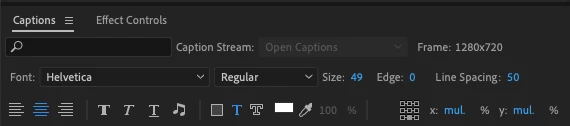
Attached two picture, first one shows the wrong alignment, second one the settings of the centred captions

Many thanks in Advance!

Dave

This topic has been closed for replies.
Correct answer dave_722

thanks Stan for your reply and taking the time to dig into that problem!

  • Running Premiere Pro 2019 13.1.4 on my MacBook, Line Spacing is set to 50 (on the complete right on the screenshot)

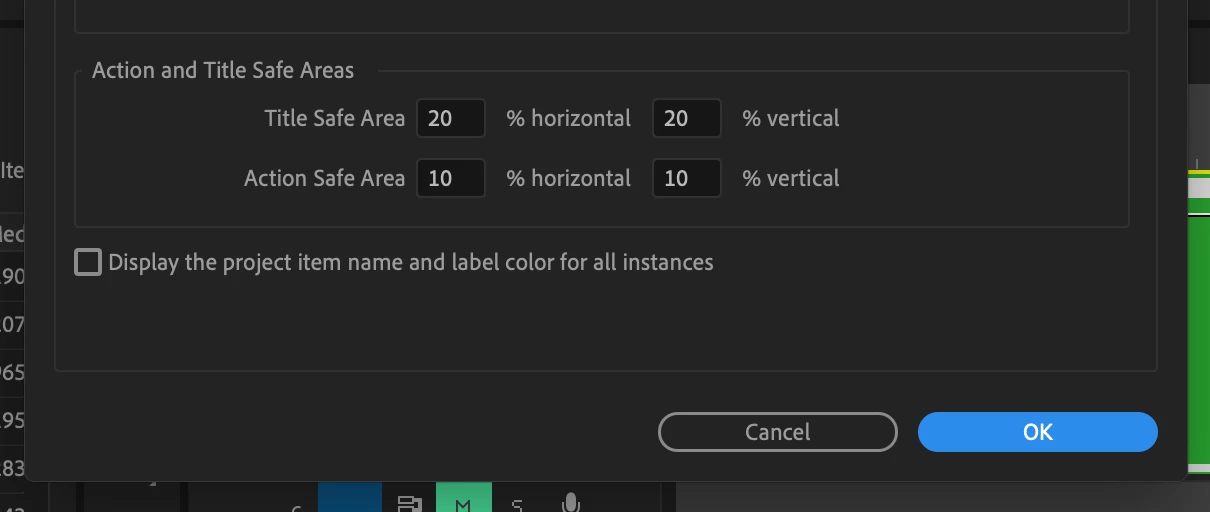
  • In my case it's probably the safe guide area, since the line of text would fit completely on the sequence area. Is there a possibility to adjust the safe guide area (even though it's probably not recommended)?

Edit: Got it!

Got it! You can change the title safe area under:
File --> Project Settings --> General...

1 reply

Stan Jones
Community Expert
Community Expert
August 5, 2019

I can't test this fully at present. I'm on the road and currently running 2019.1.0 on a Surface. What specific version are you running? I don't see the "Line spacing" option.

It appears to behave correctly until the text left edge (of the longest test line) hits the safe guide. Then it stays fixed, and allows the right end of the text to go off screen.

This is somewhat logical as, even without safe guide area, you would need to move text to the next line. Text does not word wrap in captions.

dave_722AuthorCorrect answer
Participant
August 6, 2019

thanks Stan for your reply and taking the time to dig into that problem!

  • Running Premiere Pro 2019 13.1.4 on my MacBook, Line Spacing is set to 50 (on the complete right on the screenshot)

  • In my case it's probably the safe guide area, since the line of text would fit completely on the sequence area. Is there a possibility to adjust the safe guide area (even though it's probably not recommended)?

Edit: Got it!

Got it! You can change the title safe area under:
File --> Project Settings --> General...