adamt18510785
Inspiring
August 8, 2022
Question

Captions clip from bottom

  • August 8, 2022
  • 1 reply
  • 217 views

If you have subtitles with alignment on the bottom with the bottome zone. 

You have use center algin squeeze your caption box down and lower it. 

Issue is you can't get it as low as it should be so your stuck having your captions raised about 40 px up. 


This topic has been closed for replies.

1 reply

Stan Jones
Community Expert
Community Expert
August 10, 2022

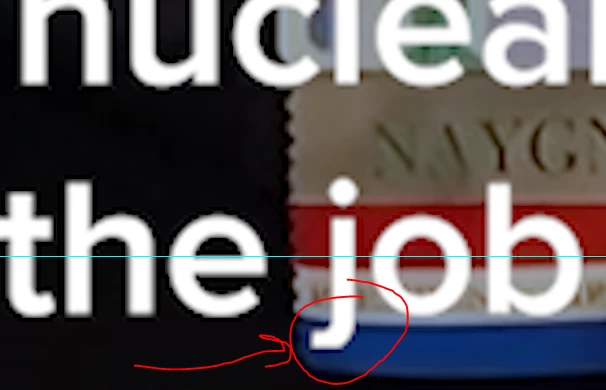
I cannot reproduce the problem you are seeing. (I am on PC.) You do not need to "squeeze" the caption box. Just set the caption to "bottom align text." There are 2 issues: how low you can position captions and h ow PR treats the "descender" letters (y, g, j, etc.).


Regarding position, here is a feature request to upvote, but you'll see that staff consider the margin as the correct behavior.

https://adobe-video.uservoice.com/forums/911233-premiere-pro/suggestions/42760940-move-captions-to-the-bottom-of-the-screen


But your issue is not the position only; it is the flattened descender (e.g. "j"). Here's a post where we concluded that there may be a difference between Mac and PC regarding padding. I am PC, so did not see the problem as described.

https://community.adobe.com/t5/premiere-pro-discussions/premiere-captions-15-0-cutting-off-descenders/m-p/12138175#M354171


I tested today using PR 22.5 and believe that this is all the same as it has been since the caption workflow change in PR 2021. The actual caption "safe margin" being applied is 5%. AND this does not include descenders, so the bottom of a "g" is not flattened even when it appears below the caption bounding box. This varies by font and size, but the descender only flattens when it goes off frame, not just out of some PR safe margin limitation.


Stan