
Participant
June 21, 2017
Answered

'Captions' option doesn't show in Premiere Pro CS6 (I want to add subtitles)

  • June 21, 2017
  • 1 reply
  • 14517 views

Hi!

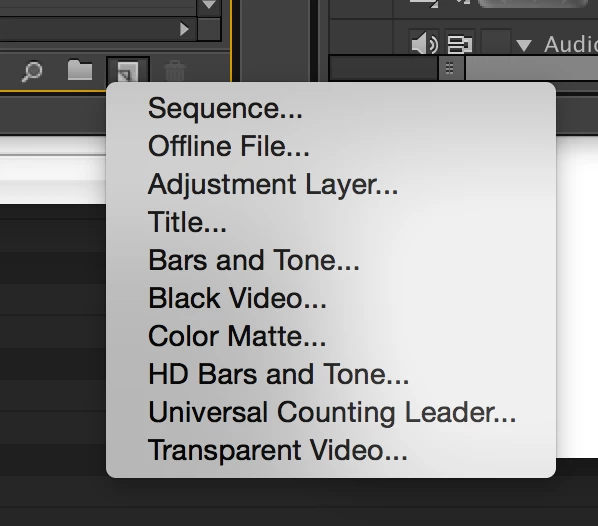
I want to add subtitles to my project but for some reason the 'captions' option in my 'new item' menu doesn't show, see screenshot.

Google doesn't have the answer for me unfortunately. Could someone here help me?

Would be amazing, thanks!

Else
This topic has been closed for replies.
Correct answer kulpreet singh

Hi ElseWisselink,

You are using Premiere Pro CS6 or an older version.

Premiere Pro CS6 can only import closed captions in .scc and .mcc format.

You have to subscribe to Creative Cloud to allow you to open a window and write/edit your own captions.

This feature was introduced with Premiere Pro CC. Premiere Pro CC new features

Let me know if you have any other query.

Thanks,

Kulpreet Singh

1 reply

kulpreet singh
kulpreet singhCorrect answer
Inspiring
June 21, 2017

Hi ElseWisselink,

You are using Premiere Pro CS6 or an older version.

Premiere Pro CS6 can only import closed captions in .scc and .mcc format.

You have to subscribe to Creative Cloud to allow you to open a window and write/edit your own captions.

This feature was introduced with Premiere Pro CC. Premiere Pro CC new features

Let me know if you have any other query.

Thanks,

Kulpreet Singh