Participating Frequently
April 17, 2019
Question

Captions question

  • April 17, 2019
  • 2 replies
  • 525 views

Hey guys. I am working on a movie with Premiere Pro CC 2019 and we need subtitles because we speak in spanish. However, the titles that I make do not fit the screen completely. I have tried to mess around with this, but do not know what to do. Please give me suggestions. The first image attached is what it looks like when I type in a title. The second image is the one when I place it in the sequence for the movie. Please help and let me get this fixed.
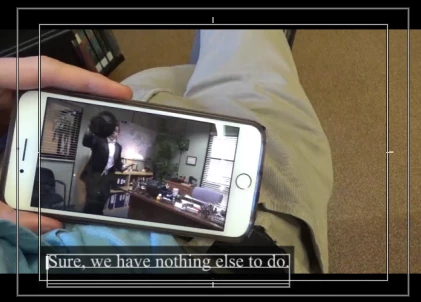
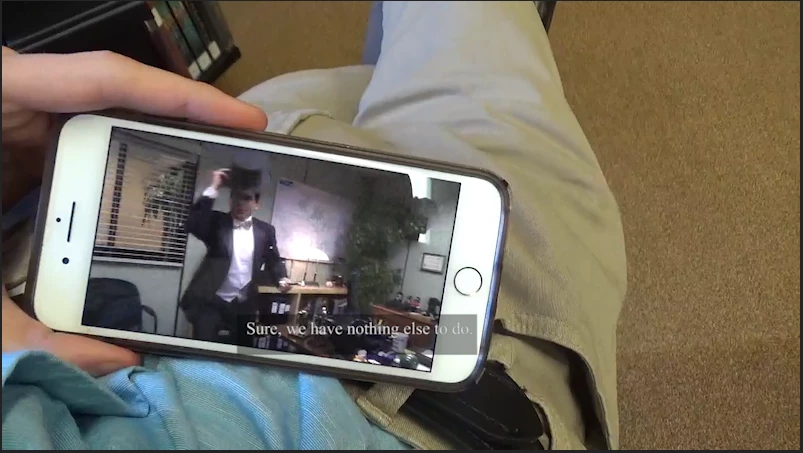
[Moderator note: title changed for clarity of tools involved.]

    This topic has been closed for replies.

    2 replies

    Stan Jones
    Community Expert
    Community Expert
    April 17, 2019

    Are you using the caption tool? Or are you using regular text titles?

    Participating Frequently
    April 17, 2019

    Regular text titles not adding as the video goes on

    khomthepreditor
    Inspiring
    April 17, 2019

    Hey! Double check your sequence settings and your title dimensions both match, and what are your export settings?

    Participating Frequently
    April 17, 2019

    Where do you find the sequence settings

    Stan Jones
    Community Expert
    Community Expert
    April 17, 2019

    Select the timeline or select the sequence in the project panel. Then Sequence -> Sequence Settings.

    Are you using the legacy title tool or selecting the title tool and typing?

    Edit: Sorry; I meant "selecting the TEXT tool and typing" which uses the newer EGP system.