Participant
January 12, 2022
Question

Captured analog footage to Premiere

  • January 12, 2022
  • 4 replies
  • 270 views

Hello all,

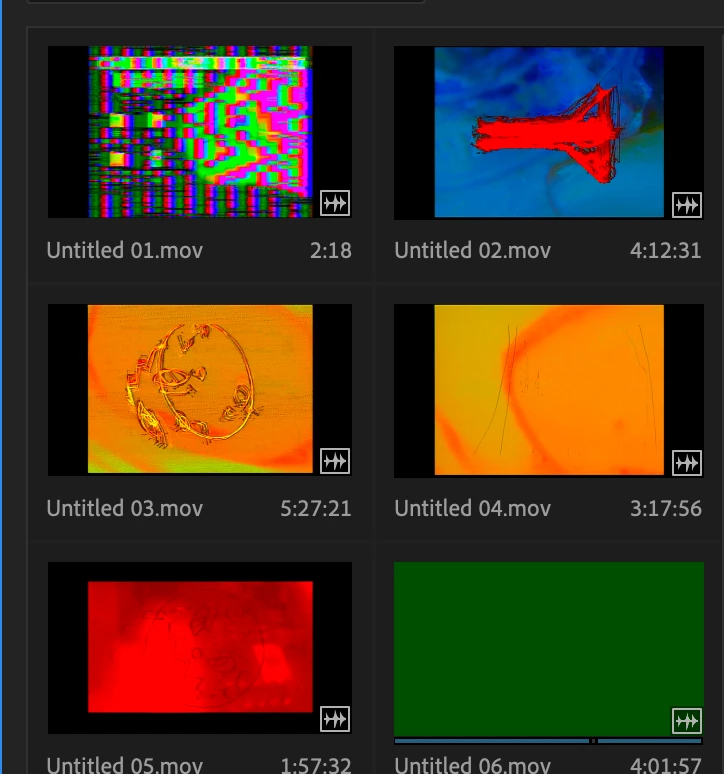
having some trouble editing with captured analog footage. I believe the footag was captured on a BlackMagic Intensity, an analog into hardware upscaler/deinterlacer that was captured via hdmi at 1280x720p pillarboxed SD. The videos in premiere just show up at a dark green- see image attached. I can see some of the thumbnails but not all. The videos are in the format: Y'CbCr 8-bit 4:2:2 but saved as .mov files, and play fine on Quicktime. They are in 1280 x 720, at 59.94 frames per second.


Any ideas? I already tried resetting my Premiere preferences. By the way, the green video that my mouse is over below is how all of them appear when I scrub through them/hover over, and/or import into a timeline.
 

This topic has been closed for replies.

4 replies

Inspiring
January 12, 2022

The Blackmagic Design products are known the world over for not being able to capture VHS tapes without a TBC. That is why I do not recommend them for that purpose. That being said the Intensity Shuttle is my favorite playback device. The video below might be helpful. 

John T Smith
Community Expert
Community Expert
January 12, 2022

>I can't view ANY video in Premiere, at all


Do not count on Windows to be fully up to date when it comes to device drivers
Go to the vendor site to be sure you have an updated driver for your graphic adapter
nVidia Driver Downloads http://www.nvidia.com/Download/index.aspx?lang=en-us
-for Premiere Pro (and MAYBE Premiere Elements) use the STUDIO driver, not the GAMING driver
-such as (this MAY not be the latest) https://www.nvidia.in/Download/driverResults.aspx/177929/en-in
If you have a laptop you MAY also need to check for a laptop specific nVidia driver
ATI Driver https://www.amd.com/en/support
Intel https://downloadcenter.intel.com/product/211969/Intel-HD-Graphics-Family
There are also intermittent reports that the newest driver is not always the best driver due to driver bugs or compatibility issues, so you MAY need to try an earlier driver version

Kevin J. Monahan Jr.
Legend
January 12, 2022

Hi,

Kooky. Love the idea. Sorry about the files, though. Sounds like your codec might be supported, but if it's not in this list, doubts shall prevail. For now, transcoding is your friend. If Media Encoder won't take them on, then Shutter Encoder will. Change them into the flavor of ProRes of your choice. 


In the future, I think you might want to tweak capture settings (if at all possible) to match up better with what Premiere Pro will accept in the way of codecs. Try ProRes, GoPro Cineform, DNx or other pro codec, but I'm not sure what that device is capable of. I wish you luck.


Thanks,
Kevin

Kevin Monahan - Sr. Community and Engagement Strategist – Adobe Pro Video and Audio
Participant
January 12, 2022

Edit: I can't view ANY video in Premiere, at all. There is no playback, except on Quicktime. Just wanted to clarify 🙂

Kevin J. Monahan Jr.
Legend
January 12, 2022

Give us your full system details, my friend. Otherwise, we are only guessing. 


Thanks,

Kevin

Kevin Monahan - Sr. Community and Engagement Strategist – Adobe Pro Video and Audio