
Participant
January 16, 2018
Answered

CC 2018 on Windows 8.1?

  • January 16, 2018
  • 2 replies
  • 6377 views

I took the offered upgrade to Premiere Pro without looking too closely, I'm afraid. After converting a 2017 project file, it opens, but all the media is gone. Black. Video, titles, graphics. Whether I look at an asset in the Preview panel, or play a sequence in the Program window, everything is black. Somehow the audio is still there but THAT'S ALL.

Should I have stayed with CC 2017? I'm hoping somebody has a neat trick that will restore everything back into the project. I hate uninstalling and reinstalling.
This topic has been closed for replies.
Correct answer R Neil Haugen

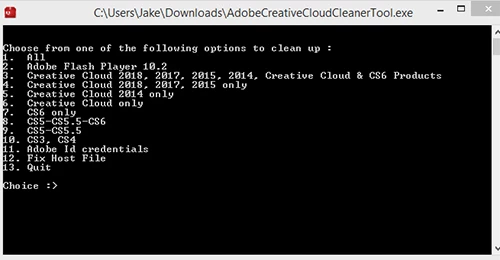
I was in the middle of the Cleaner Tool when confronted with these options of programs to blow away. Seems kind of drastic. I expected to see something that would let me cherry pick Premiere 2018.

Thanks for your help, whether or not you have other suggestions.


Choose the number 4 option, and it then gives you another screen of options to choose. It doesn't start the uninstall until you get to the screen where you say yes and then confirm you want to uninstall.

Neil

2 replies

Legend
January 16, 2018

Post up the details.  Follow the guide below.

How To Ask For Help

R Neil Haugen
Legend
January 16, 2018

Allowing PrPro to convert a project file in a major upgrade isn't as stable as creating a new project in the new version, then using the Media browser to navigate to a duplicate of the previous version's project file and import that into the new version. If you have duped the 2017 file before converting to 2018, I'd make another fresh dupe, then import that as above.

Neil

Everyone's mileage always varies ...
asylvestAuthor
Participant
January 16, 2018

I didn't dupe the file before upgrading — I can see how it's best practice — but it's never stung me before. Anyway, I created a new project, navigated to the old project file in the Media browser, and imported it.

Same basic result. Here's something odd, which may provide a clue. Although the Program panel is black when I play a sequence, when I called up a legacy title from the Projects panel, I could see the video behind the lower-3rd title. The background image comes where the playhead is stopped on the sequence timeline, but the Program panel remains black.

Thanks for your help.

R Neil Haugen
Legend
January 16, 2018

Sha-zang! YOU have found a new weirdity!

Don't you feel so ... honored?

Um ... not so much, eh? Well, at times a bit of humor helps break up the monotony of angst ...

This is truly bizarre. You see nothing, but if you put an old Titler created title, you see your media while the title is 'up'. But not otherwise. I've never seen nor heard anything quite like this ... and at this point, the best option I see is the nuclear option:

  • Download the Adobe CC Cleaner Tool:

https://helpx.adobe.com/creative-suite/kb/cs5-cleaner-tool-installation-problems.html

  • Use that to uninstall & cleanup after Premiere Pro, so you obliterate the 2018 PrPro from your machine. Reboot your machine.
  • From the CC App, install a fresh copy of PrPro. Reboot, then open and test.

Let's see if this gets anything running.

Neil

Everyone's mileage always varies ...