Puffancs
Participating Frequently
October 22, 2018
Answered

CC v13.0 - On timeline clip selection is barely visible

  • October 22, 2018
  • 2 replies
  • 282 views

Hi all!

I don't know if it's a bug, or a new thing, but I can barely see which clip is selected.

In v13 clip selection (only on video tracks) doesn't highlight all the clip, just the borders of it.
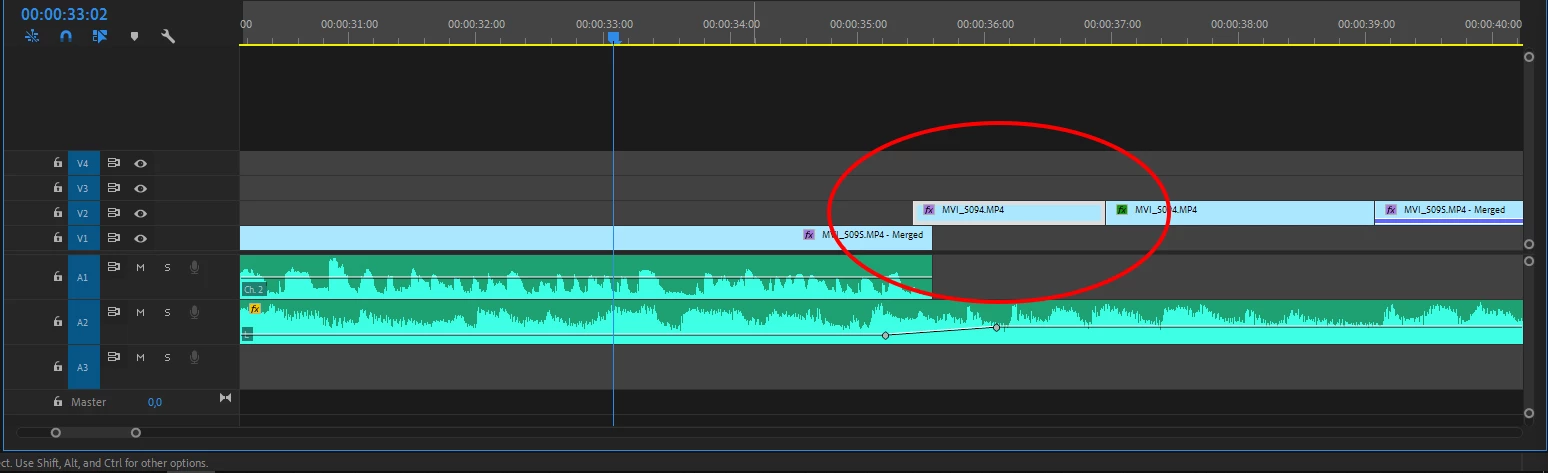
It's a minor thing but rather annoying. Is there a setting for this? I couldn't find one.

Thank you for the help!

Iván

This topic has been closed for replies.
Correct answer Averdahl

It´s a new feature in CC2019 and the purpose is to being able to see label colors on selected clips easier than it was in previous versions. AFAIK, there is no setting that reverts back to the older behaviour when selecting clips. Making the track bigger makes it a tad easier to see.

Another new feature that relates to selected clips is that it is enough to press the ESC key on the keyboard to de-select clips. That´s a great feature imo.

2 replies

Puffancs
PuffancsAuthor
Participating Frequently
October 22, 2018

Thank you! I hope in a future version there will be a switch for this.

In the meantime I'll use bigger tracks as you advised.

Thanks again!

Averdahl
Community Expert
AverdahlCommunity ExpertCorrect answer
Community Expert
October 22, 2018

It´s a new feature in CC2019 and the purpose is to being able to see label colors on selected clips easier than it was in previous versions. AFAIK, there is no setting that reverts back to the older behaviour when selecting clips. Making the track bigger makes it a tad easier to see.

Another new feature that relates to selected clips is that it is enough to press the ESC key on the keyboard to de-select clips. That´s a great feature imo.