Inspiring
November 17, 2019
Answered

Change default overwrite behaviour

  • November 17, 2019
  • 2 replies
  • 3804 views

Hi,

 When you first do an overwrite edit, Premiere asks you what you want to do i.e:


Change Clip Speed (Fit to Fill)

Trim Clip’s Head (Left Side)

Trim Clip’s Tail (Right Side)
Ignore Sequence In Point
Ignore Sequence Out Point


I clicked the wrong one and also ticked the "remember for future" box and now for the life of me can't work out how / where to change this default. It's driving me crazy! Does anyone know how to change this?

Thanks, 

Paul
This topic has been closed for replies.
Correct answer Meg The Dog

Here:

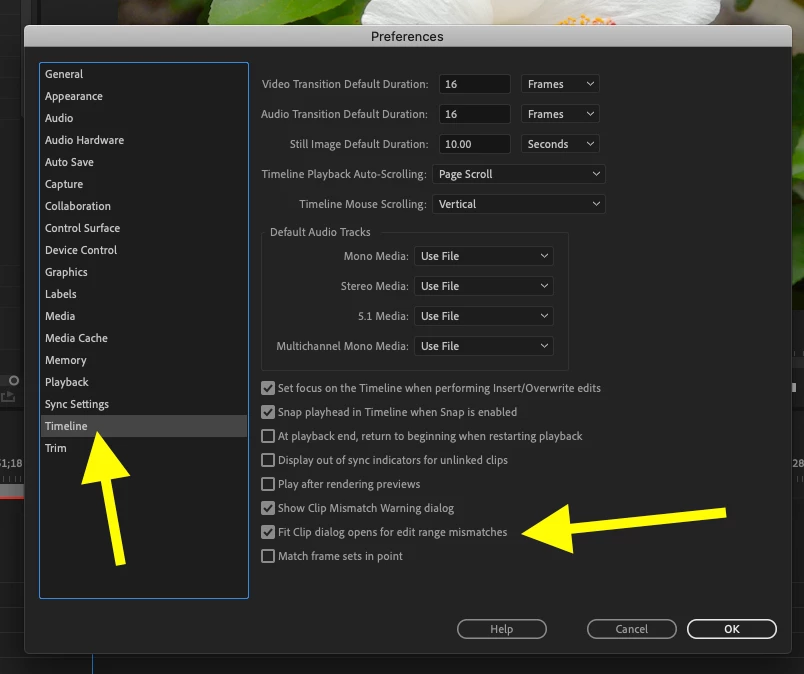
Re-check the box for Fit Clip dialog box opens for edit range mismatches.

MtD

2 replies

Meg The DogCorrect answer
Inspiring
November 17, 2019

Here:

Re-check the box for Fit Clip dialog box opens for edit range mismatches.

MtD

pallen33Author
Inspiring
November 17, 2019

I can't express how much gratitude I have for you showing me this Meg_The_Dog! I was losing the plot, and completely over-looked this. Many many thanks, 

Paul

Averdahl
Community Expert
Community Expert
November 17, 2019

Those things are stored in Premiere Pro Preferences file. Here is how to reset it: FAQ: How to reset (trash) preferences in Premiere Pro?


Mind you that all other settings you have done in Edit > Preferences will be resetted back to default as well. So if you have done changes you have to redo them.

pallen33Author
Inspiring
November 17, 2019

Many thanks Averdahl, much appreciated. Seems a bit strange that you have to trash preferences to re-set this, but I'll take it right now as I've been searching around the menus for far too long.

Thanks, 

Paul