



markkoskg15941118
Inspiring
March 17, 2019
Question

Change skin color person with Lumetri?

  • March 17, 2019
  • 14 replies
  • 5170 views

I have some videos of the same model, but in all the videos their skin color is different because they are different cameras.

How should I make all skin colors look similar with Lumetri Color?

For example, I like the image 1 and would like all the videos to be seen with that color tone.

And the image 2 I do not like. It looks too orange.
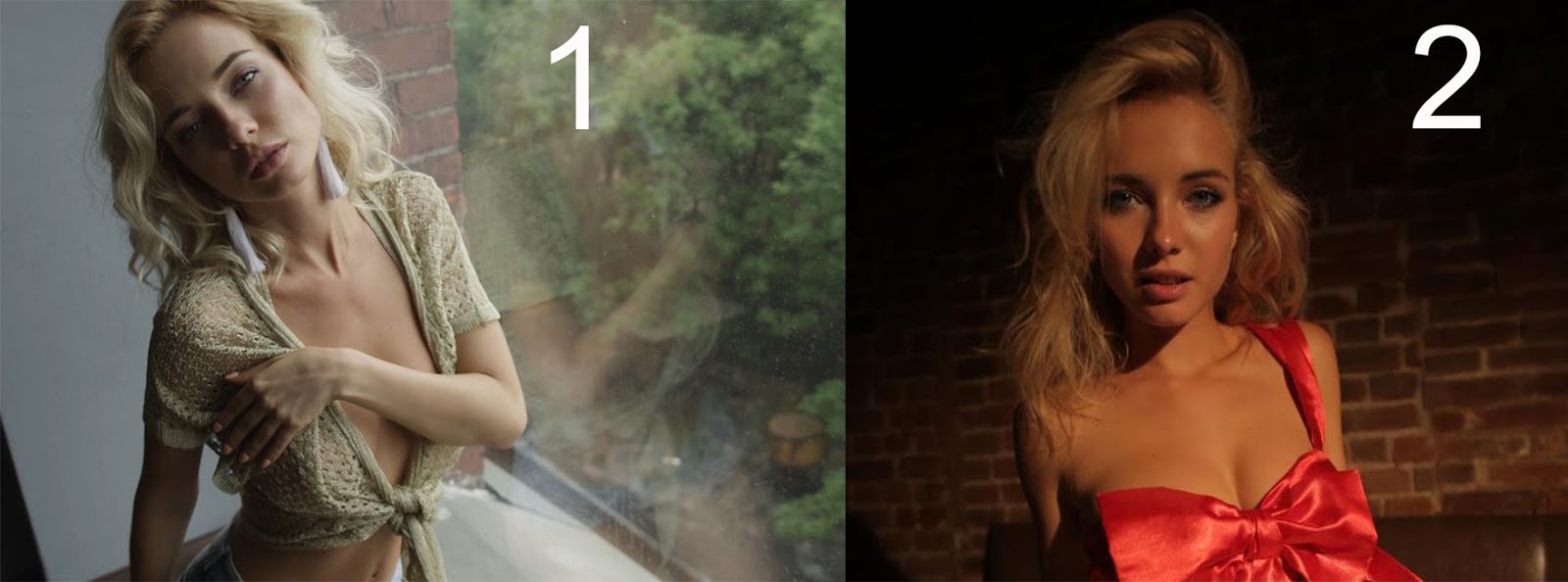
XX1.jpg

The videos are not made by me, so I do not have the RAW file.

I do not put videos as an example because it's +18

This topic has been closed for replies.

14 replies

Legend
March 18, 2019

One more note: re: delivery

I exported a 1080p timeline to 720p and uploaded sample to vimeo ( about 10 seconds).

If you are delivering to some specific media ( web, DVD, BD, etc. ) so a little test at some point... so you can SEE what the outcome is. Weird things happen to color and tonality when delivered. And also everybody PLAYS things ( to watch ) with different color monitors etc...

So before you get too nuts about being exact with all your color and balance adjustments, do a little test export to see what you are getting.  That way you have the whole workflow down pat and know what little adjustments you might want to make so the final product is as good as you can get it.

I'll delete this in a few days...

PICTURE TEST-1 on Vimeo

Legend
March 18, 2019

corrected version (using scopes for Y LIFT )

PICTURE TEST 2 on Vimeo

will delete this stuff in a few days or before then if you happen to see the stuff before then.

Legend
March 19, 2019

video deleted from vimeo… links no good anymore.

chrisw44157881
Inspiring
March 18, 2019

you can either match all with color chart or use pure scopes. you can isolate certain parts and match up HSL and YUV scopes by changing hue, lightness, saturation. there are new hue tools.

Legend
March 18, 2019

Doing it fairly quickly on laptop (not using editing computer with panel controls ) you can get something a bit more palatable doing basically what Neil suggested.  See image below.

There are things you can do to make it better but it would require a bit more work selecting specific stuff (areas) and I don't believe you'd ever get it to 'match' your first sample. The light is simply harder in 2nd shot (more contrasty ) and the color temp is totally different overall.

If you had the raw stuff it might help a bit but probably wouldn't be a magic solution either.

Legend
March 18, 2019

A note about lighting, in case you ever get to talk to the guys shooting video (raw ) that you are getting sent to you.

daylight is 56k color temp. The light from outside, coming in window of 1st shot, is 56k. Even shooting raw the camera should be set to 56k.

The indoor light used in the 2nd shot is 32K. If ( even shooting raw ) the camera was set to 56k then what you are seeing is exactly what you end up with.

The thought that you can change color temp in RAW to anything you want is sorta true, but it's really a good idea to try and match the temp of the lighting when you shoot anyway.  Less adjustments have to be made and it's my belief the product comes out better.

Some will disagree, that it doesn't matter. But what you SEE in your 2nd shot is exactly why the color temps should match.

This is also why full CTO and full CTB color correction film gels ( on 4 foot rolls ) are made by Roscoe and Lee Filters.  If you put full CTB on the 32k light indoors, it turns that light into the DAYLIGHT color temp ( 56k ).  This is handy when mixing tungsten ( indoor light ) with light coming from outside. It's a long subject.

Nowadays the (expensive) new LED lights can be dialed in to any color temp you want including 32k and 56k, so you don't have to use the color correction gels.

Anyway, that is what is causing your problems... it's not being different CAMERAS, it's the difference in LIGHTING.

R Neil Haugen
Legend
March 18, 2019

Fine controls in color work take some knowledge, training,  and just plain time practicing. To get a smooth result for what you want could take work in Basic, Creative, and Color Wheel or Curves tab, with or without some HSL. Or maybe easier, depending on many things.

First suggestion is second image has too high saturation. That will take care of part of the issue. Next could be working Creative Tab Shadow/Highlights tint wheels for a bit of cooling the color if needed, and/or Color Wheels to do something similar, and/or work in the new Curves tab to pick the skin tone and modify hue and saturation to taste.

Neil

Everyone's mileage always varies ...
cmgap
Community Expert
Community Expert
March 18, 2019

This is a brief (4-min) intro to the Lumetri color correction controls: Adjust colors & white balance |