
Participant
June 24, 2019
Answered

Change time code

  • June 24, 2019
  • 2 replies
  • 589 views

Hello, dear users of Adobe programs. I’ve been using Adobe Premiere Pro for 5 years but I’ve never got this problem. When I click with right mouse button on video in timeline and choose “Speed/duration” I have strange frames instead of seconds. I need to have 00:00:07:00 for instance. But I have 13+2. How to change this to default settings?!
    This topic has been closed for replies.
    Correct answer Meg The Dog

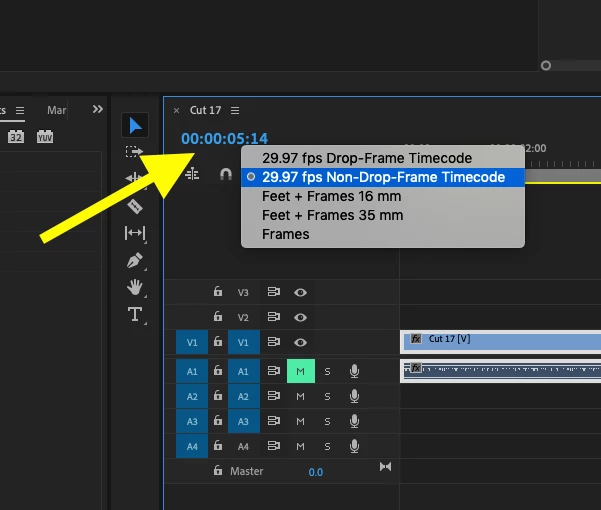
    Right click on the numbers of the time display in the Timeline and from the drop down menu, switch to timecode. You are currently set to Feet + Frames:

    MtD

    2 replies

    Meg The DogCorrect answer
    Inspiring
    June 24, 2019

    Right click on the numbers of the time display in the Timeline and from the drop down menu, switch to timecode. You are currently set to Feet + Frames:

    MtD

    DelphiZoa
    Participating Frequently
    June 24, 2019

    Hi Bluzaq,

    Have you tried going to the timecode menu and selecting "Start at 00:00:00:00". Does that help? Alternatively, there is lots of advice for working with timecode in this help document: Work with timecode in Premiere Pro​.