Known Participant
January 1, 2024
Answered

change time to hours minutes seconds frames.

  • January 1, 2024
  • 2 replies
  • 668 views

I havent used Premiere in a while.  It is currently set to 00:00:00:0000 which means I cannot use the controls to see frame to frame.  I would like to set it to 00:00:00:00.  I can't figure out how to do this. 

This topic has been closed for replies.
Correct answer Averdahl
quote

It doesn't have "Show audio time units" in the options when I click on the wrench.


By @MARKARKARK


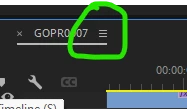
Click on the "hamburger menu" on the timeline tab and then choose Show audio time units.


2 replies

MyerPj
Community Expert
Community Expert
January 1, 2024

It's there...


MyerPj
Community Expert
Community Expert
January 1, 2024

under the Wrench Icon turn off 'Show audio time units'

Known Participant
January 1, 2024

It doesn't have "Show audio time units" in the options when I click on the wrench.

Known Participant
January 1, 2024

I am wanting to do this for all of the clips.