
Inspiring
November 29, 2016
Answered

Changed resolution size with dynamic links

  • November 29, 2016
  • 3 replies
  • 2998 views

Hi there,

I have a dynamic linked file in Premiere. When I started editing the AE file, the dynamic link changed the resolution to roughly 960x540. The comp in After Effects is still 1920x1080, and the resolution of the dynamic link in Premiere is still 960x540 at 100% scale.

Has anyone else experienced this? I don't want to scale it in Premiere for fear of quality loss.

Any help would be much appreciated!
This topic has been closed for replies.
Correct answer Meg The Dog

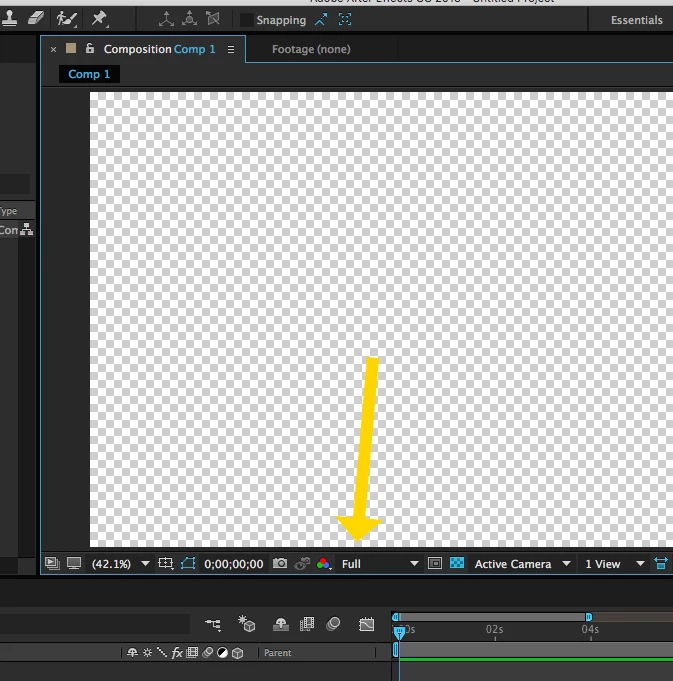
Re-open the Comp in AE and set the display resolution to Full:

MtD

3 replies

Participant
January 25, 2017

it's so bloody annoying, and you WILL get renders wrong at some point.

Inspiring
November 29, 2016

I just found the answer!

If you change the quality of the AE file to half, it shows the dynamic link as 960x540 (hence, half the resolution).

Hope this helps anyone!

Meg The DogCorrect answer
Inspiring
November 29, 2016

Re-open the Comp in AE and set the display resolution to Full:

MtD

flowsnone
Inspiring
December 18, 2016

I have the same problem and IMO this is such a huge source of getting errors in your projects.

When i'm in AE, i almost always work in 1/3 oder 1/2 resolution. This is no improvement, it's just another thing you always forget while working.

Now I have to switch back and forth all the time.

It would be really nice to have an option to globally render all AE comps in a timeline in full resolution

Inspiring
December 18, 2016

You need to put in a feature request:

Feature Request/Bug Report Form

MtD