Inspiring
February 22, 2017
Answered

Changing size of video in Premiere Pro

  • February 22, 2017
  • 1 reply
  • 2574 views

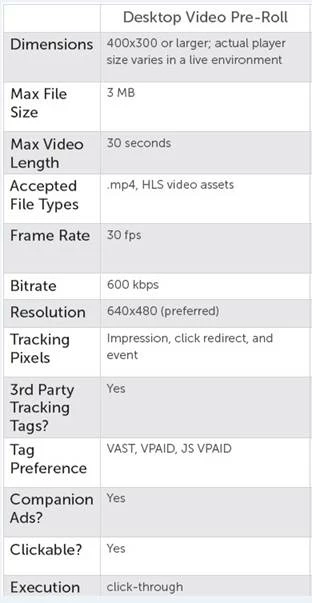
I admit I have only used Premiere Pro to change the size of a video to launch onto a newspaper website when they were using Flash. It was fairly simple. I imported the video and then exported media with FLV/FLV4 in the format. This allowed me to change the width and height. Now they need these specs. I don't see any option for mp4. And no matter what I choose it doesn't give me the option to change the width and height. I have went through several of the tutorials and forums and am not finding anything to help with this. Can someone explain how to do this please?
    This topic has been closed for replies.
    Correct answer R Neil Haugen

    The H.264 format is all mp4, so you've a wide range of presets to begin with.

    Right near the top of the Presets list is the "Android Phone & Tablet" option of 480p, the standard (not the widescreen) form of that gets you 640x480 frame-size.

    Now you just start going down through the options. In the video tab set the frame-rate to 30, and the bit-rate controls set the file-size. If the estimated file size exceeds the limit, back down the Target or Max bit-rates ... if you've got some headroom left to meet the limit, lift the Target & Max bitrate settings.

    Neil

    1 reply

    R Neil Haugen
    R Neil HaugenCorrect answer
    Legend
    February 22, 2017

    The H.264 format is all mp4, so you've a wide range of presets to begin with.

    Right near the top of the Presets list is the "Android Phone & Tablet" option of 480p, the standard (not the widescreen) form of that gets you 640x480 frame-size.

    Now you just start going down through the options. In the video tab set the frame-rate to 30, and the bit-rate controls set the file-size. If the estimated file size exceeds the limit, back down the Target or Max bit-rates ... if you've got some headroom left to meet the limit, lift the Target & Max bitrate settings.

    Neil

    Everyone's mileage always varies ...
    Inspiring
    February 23, 2017

    Thank you. Taking a long time to upload so probably still going to have to work with the bit rates, but this was very helpful in knowing where to begin.