Participant
May 31, 2020
Answered

Choppy playback while using proxies

  • May 31, 2020
  • 3 replies
  • 1058 views

So, I have some 4k footage (3840x2160), and I created an ingest preset to create 960x540 proxies. I've tried using H.264 as the codec, but it was very choppy and I had read that this isn't a good format for proxies, so I tried again using GoPro Cineform, but it's still very choppy. I tried all of the playback resolutions (and I've checked, the proxies button is enabled), and I'm on a fairly new Mac, but nothing seems to help. Is there something I'm missing?


Premiere Pro Version 14.1.0

GoPro Cineform

30 FPS

960x540 Resolution

2019 Macbook Pro, Version 10.15.4

2.4 GHz Quad-Core Intel Core i5

8 GB 2133 MHz LPDDR3

Intel Iris Plus Graphics 655 1536 MB
This topic has been closed for replies.
Correct answer Meg The Dog

Your original footage is 30FPS? Not 29.97?

What camera shot this?

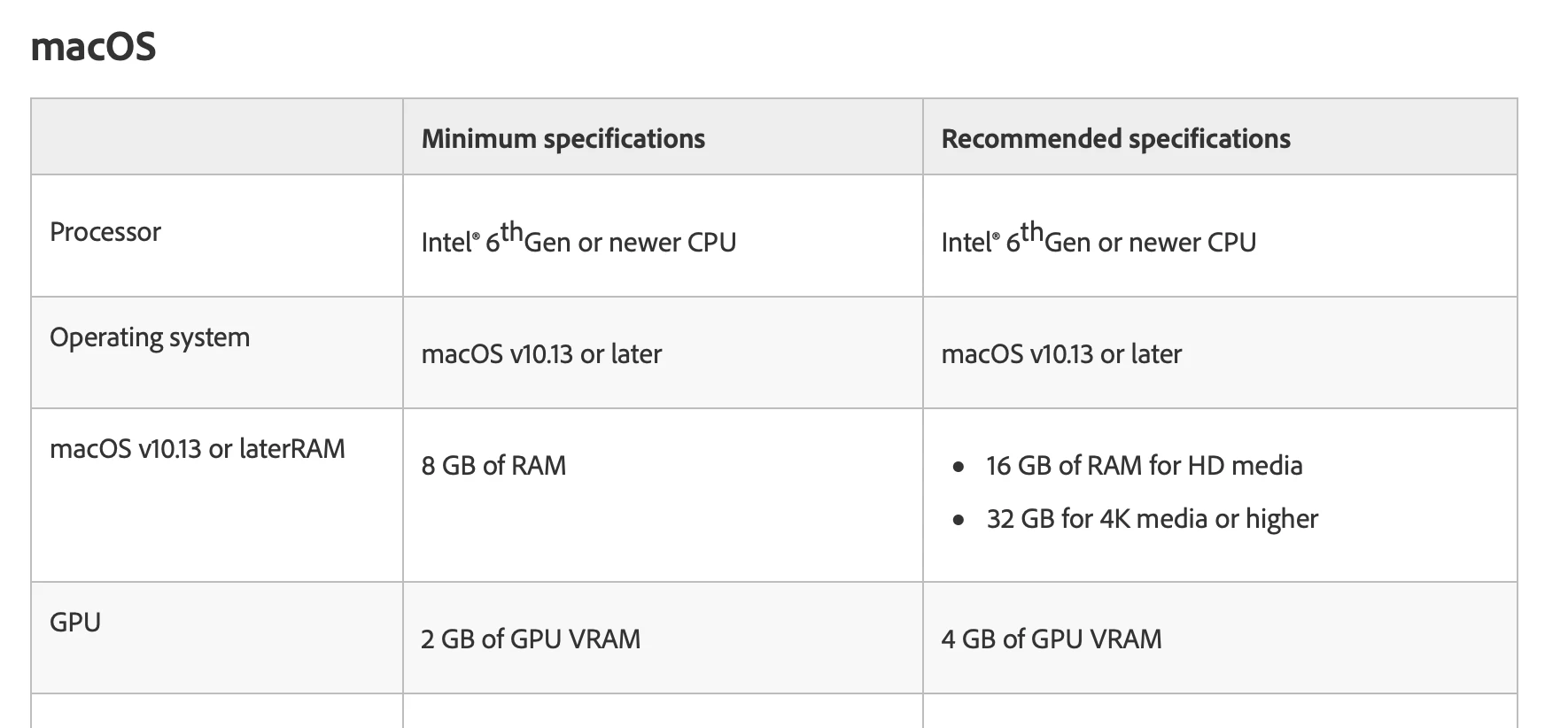
The  spec for the GPU on your computer is below the Premiere required 2GB minimum, 4GB recommended tech requirement for Mac:

Since you are on a Mac the optimum codec for your proxies would be ProRes LT. 


MtD

3 replies

Participant
July 19, 2020

Ah after a solid 5 hours troubleshooting similar issues - trying everything in adobe articles, changing file types (as recommended by YouTubers) and playing with other settings. I realised it was audio input - automatically picking up a new mic software thing I'd installed and that was the cause of all the choppiness. SO simply try to change the Audio input under Edit > Preferences > Audio Hardware > Default Input / Output change to your inbuilt computer option  - Not 100% sure it'll work for you, but I had of wished I saw this suggestion 5 hours earlier lol 

MyerPj
Community Expert
Community Expert
June 1, 2020

I just wanted to throw in you're at the very low end of the requirements for memory. It's good you are looking at Proxies. 

Meg The DogCorrect answer
Inspiring
May 31, 2020

Your original footage is 30FPS? Not 29.97?

What camera shot this?

The  spec for the GPU on your computer is below the Premiere required 2GB minimum, 4GB recommended tech requirement for Mac:

Since you are on a Mac the optimum codec for your proxies would be ProRes LT. 


MtD