Participant
May 28, 2025
Answered

Choppy Slow Motion

  • May 28, 2025
  • 3 replies
  • 1419 views

I'm not sure why this is happening all of a sudden. My slow motion is incredibly choppy when I slow the speed down to 45%. I'm aware that I have to raise the frame rate on my camera to give it the smoothness. I raise it to 60 frames which is the highest my camera can go. It always seems to work, but now all of a sudden, my slow motion is super choppy. I usually lower the sequencer settings to 24 frames since its a music video, but now it seems like every thing is just choppy. 

    Correct answer Averdahl

    Slowing 60 fps down to 45% will give you 27 fps and that will look somewhat choppy in a 24 fps timeline. 


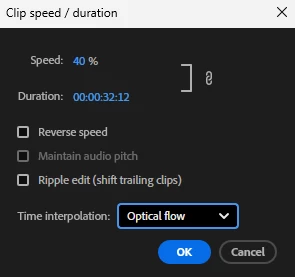
    Try to slow down the 60 fps footage to 40%. That will give you 24 fps that will play nice in a 24 fps timeline. And, make sure to select Optical Flow as the Time Interpolation. Optical Flow do wonders.


    quote

    ...when I slow the speed down to 45%.

    ...I raise it to 60 frames which is the highest my camera can go.

    ...I usually lower the sequencer settings to 24 frames since its a music video


    By @kevinj47093878

    3 replies

    Averdahl
    Community Expert
    AverdahlCommunity ExpertCorrect answer
    Community Expert
    May 28, 2025

    Slowing 60 fps down to 45% will give you 27 fps and that will look somewhat choppy in a 24 fps timeline. 


    Try to slow down the 60 fps footage to 40%. That will give you 24 fps that will play nice in a 24 fps timeline. And, make sure to select Optical Flow as the Time Interpolation. Optical Flow do wonders.


    quote

    ...when I slow the speed down to 45%.

    ...I raise it to 60 frames which is the highest my camera can go.

    ...I usually lower the sequencer settings to 24 frames since its a music video


    By @kevinj47093878
    Peru Bob
    Community Expert
    Community Expert
    May 28, 2025

    Check the Audio Hardware Preferences. Default Audio Input should be set to No Input.

    Participant
    May 28, 2025

    The audio settings can effect the visuals??

    Peru Bob
    Community Expert
    Community Expert
    May 28, 2025

    Yes.

    kglad
    Community Expert
    Community Expert
    May 28, 2025

    what app?

    Participant
    May 28, 2025

    Premiere Pro