
NangaParbat
Known Participant
September 24, 2017
Resuelto

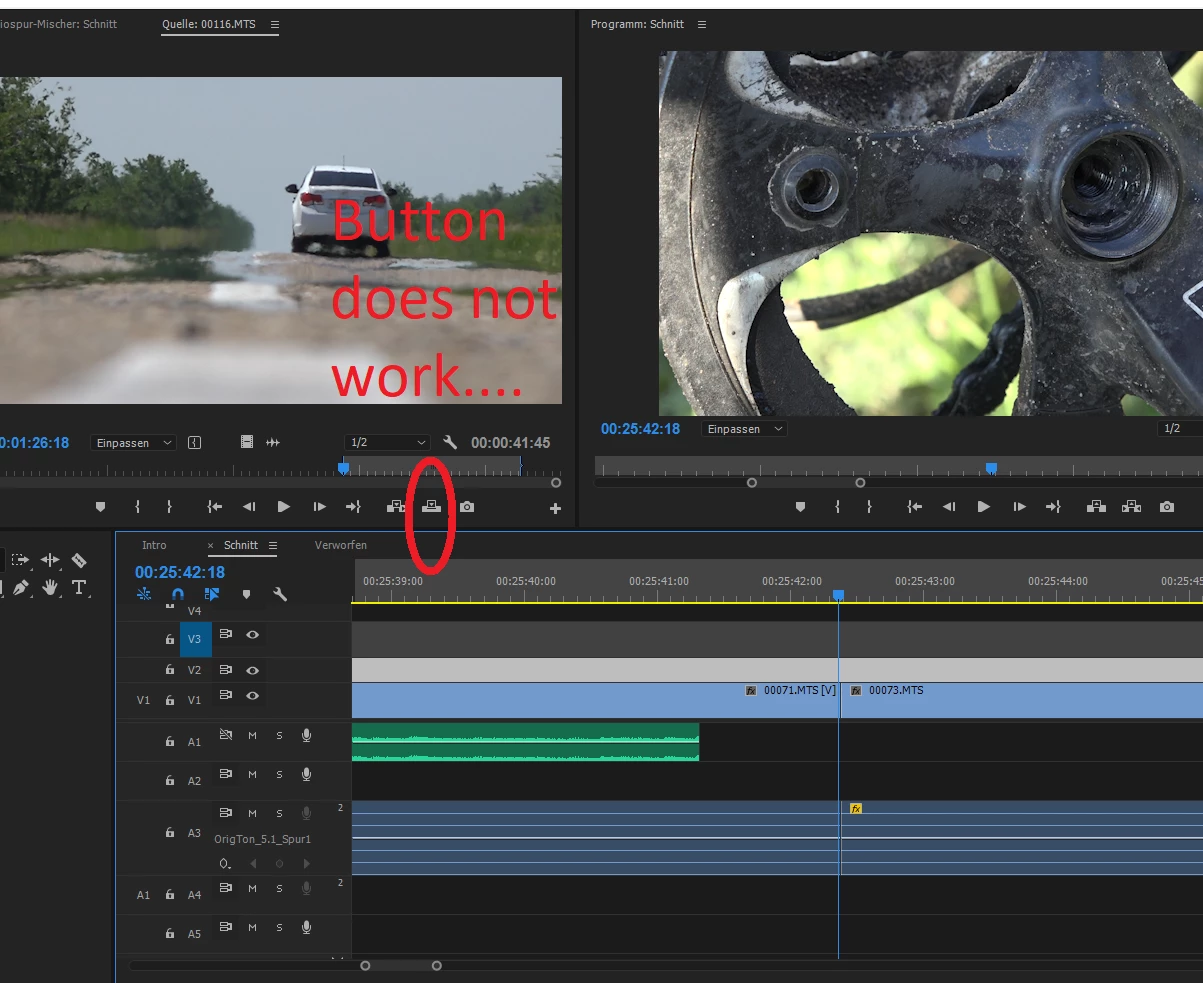
Click the "insert-button" from source monitor --> Nothing happens

  • September 24, 2017
  • 3 respuestas
  • 726 visualizaciones

Hello

i am just wondering why the "insert"-Button does not work in my Premiere Pro project. In other sequences in the same project it works fine.
But in my main sequence, if I want to insert a clip (and shift all the following clips automatically to the right side), nothing happens. (See screenshot)

Does anyone know the reason?

Thanks for your help!
    Este tema ha sido cerrado para respuestas.
    Mejor respuesta de RobShultz

    On the left side of the timeline you have nothing selected in the patching area. If you click on the V1 and A1 to the left of the locks (they should turn blue)  then the insert button should work and your video will insert into those tracks.

    3 respuestas

    NangaParbat
    Known Participant
    September 24, 2017

    @RobShultz and Jim_Simon: Thanks very much for your help which solved the problem

    Legend
    September 24, 2017
    RobShultzCommunity ExpertRespuesta
    Community Expert
    September 24, 2017

    On the left side of the timeline you have nothing selected in the patching area. If you click on the V1 and A1 to the left of the locks (they should turn blue)  then the insert button should work and your video will insert into those tracks.