Participant
Aug 26, 2025 5:46 PM UTC
Answered

clicking linked clips

I've been using Premiere Pro professionally for nearly 10 years and this is a change implemented only within the last few months. It used to be that if there was a clip in a timeline of linked video and audio, clicking on either the video or the audio clip would select both assets. In order to select just one in isolation you could hold down the option key. Now, you have to hold the command key in order to have the linked clip select all its corresponding assets. Please bring the old ways back, or allow for users to change in preferences. Not everything has to be like Davinci Resolve. 

MyerPj
MyerPjCorrect answer
Community Expert
Aug 26, 2025 7:52 PM UTC

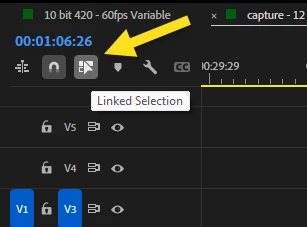
Do you have this button on? (Left part of timeline)


3 replies

Adobe Employee
Aug 26, 2025 11:30 PM UTC

Hi Edith Belmont,

It seems like Linked Selection is disabled on your timeline. As suggested by MyerPj, please enable it & check if it's working properly.


Thanks,

Sumeet

Translate
MyerPj
Community Expert
MyerPjCommunity ExpertCorrect answer
Community Expert
Aug 26, 2025 7:52 PM UTC

Do you have this button on? (Left part of timeline)


Translate
Participant
Aug 27, 2025 2:07 AM UTC

Yes! Brilliant. Pardon the rage and thanks for your help! We're back on track. 🙂 

Translate