

EvanLNorthCoast
Inspiring
February 7, 2019
Question

Client Monitor is out of sync with Program monitor / audio

  • February 7, 2019
  • 2 replies
  • 2082 views

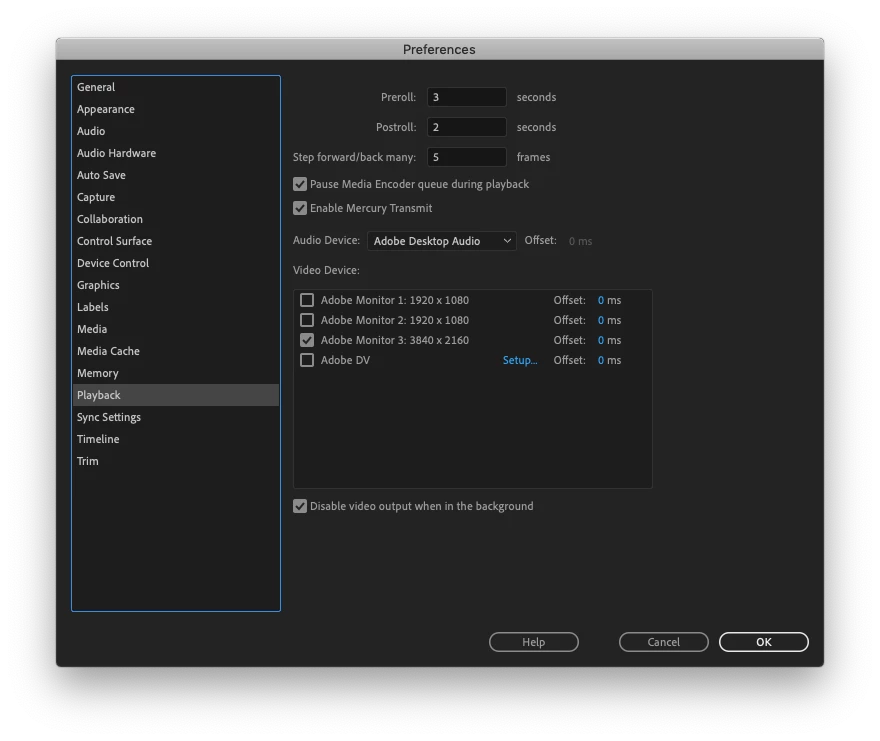
I am Mercury transmitting my video feed to an external (client) monitor via HDMI cable. The video in the program monitor is in sync with the audio, but the video being transmitted to this external client monitor is out of sync with that audio. This external monitor is what the clients see, and it can be odd for them to see everything out of sync. Is there a way using offset settings to get everything (audio, program monitor video, and external monitor video) to all line up correctly?

Changing the TV's settings to "game mode" as I've read on another forum had no effect on the delay.

Thanks!
2 replies

canwill355
Participant
August 8, 2023

Did you ever resolve this issue?  I have the same issue plaguing my client presentation monitor which is a large screen Sony screen

R Neil Haugen
Legend
February 7, 2019

Have you tried using the Offset settings on the Transmit monitor in the panel you posted?

Neil

Everyone's mileage always varies ...
EvanLNorthCoast
Inspiring
February 7, 2019

I was able to adjust the offset settings in order to get the audio to line up with the Transmit monitor (and I guess that is good enough for when the client comes in tomorrow), but it seems like, in doing that, the audio is no longer synced up in the source and program monitors.

R Neil Haugen
Legend
February 7, 2019

The settings are for each monitor ... so changing the one for the Transmit monitor changed the one for your monitor/s?

Neil

Everyone's mileage always varies ...