


Known Participant
January 7, 2025
解決済み

Clip Outline Color in the timeline can't see where clip begins or ends

  • January 7, 2025
  • 返信数 2.
  • 307 ビュー

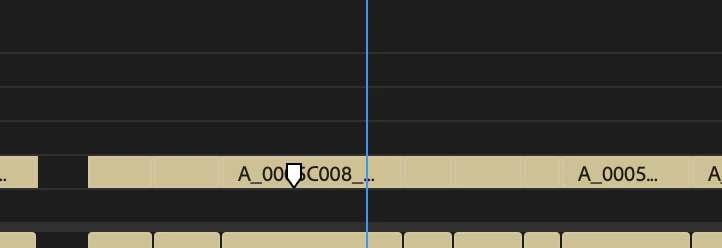
 In Premiere 2025, the clip colors have almost the same outline color so it just looks like a continuous clip. The audio has dark outline that clearly shows where the clip begins and ends. This is the case for all the different colors for the video clips. Is there any setting to get the outline? 
解決に役立った回答 Kevin J. Monahan Jr.

It's fixed in Beta, I believe. I mentioned that last month and it remains the case. Sorry about that.


Thanks,
Kevin


返信数 2

Participant
February 26, 2025

That issue is still here... and probably won't be solved. 

Kevin J. Monahan Jr.
Community Manager
Community Manager
February 26, 2025

It's fixed in Beta, I believe. I mentioned that last month and it remains the case. Sorry about that.


Thanks,
Kevin


Kevin Monahan - Sr. Community and Engagement Strategist – Adobe Pro Video and Audio
Kevin J. Monahan Jr.
Community Manager
Community Manager
January 7, 2025

Hello @atxspencer,

I believe this is a bug that is fixed in Beta and will be available in an upcoming version of Premiere Pro. In the meantime, expand the track a bit and you'll see the clip boundaries much better. See if that works for you, my friend.


Thanks,

Kevin


Kevin Monahan - Sr. Community and Engagement Strategist – Adobe Pro Video and Audio
