Inspiring
October 3, 2020
Answered

Clip Playback only Play Audio No Video

  • October 3, 2020
  • 2 replies
  • 860 views

Hi,


Currently I'm using Premiere Pro 14.4.0 (Build 38), I'm having issue with playback a clip will only play the audio but the video freeze with the playback slider is not moving at all. I also tried to use only 1 Title and playback but this time nothing happen because there is no audio:
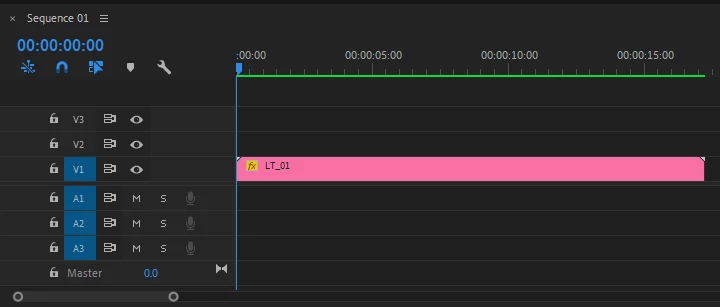
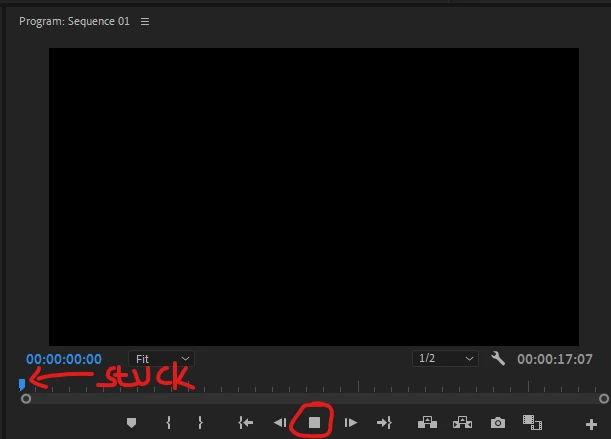
I've tried to change the renderer in Project Settings > General > Software Only but still the same issue, I also have search through the forum and tried the solution like Update Graphics Card, SHIFT + ALT during Premiere Load (Reset Plugin and Cache), Delete Media Cache, Reinstall Premiere, Reboot Computer but nothing is work.


So I uploaded my System Information if someone can help me.


Thanks a lot.

This topic has been closed for replies.
Correct answer Henoch0D44

I found the answer on separate Thread NDI Output Causing Playback Freeze.

2 replies

Legend
October 3, 2020

does the clip play in the source monitor?  Please tell us the source properties:  codec, frame rate, pixel dimensions and your sequence settings.

Is this clip by any chance from a smart phone or screen recording program?  If so, the issue may be caused by a variable frame rate.

Here's Adobe's take on the issue

https://community.adobe.com/t5/premiere-pro/faq-issues-with-screen-recorded-footage-in-premiere-pro/td-p/10874355?page=1

And here's how to diagnose and solve the problem


use mediainfo to determine whether your source is variable or constant frame rate

https://mediaarea.net/en/MediaInfo/Download

if it's variable use handbrake to convert to constant frame rate

https://handbrake.fr
and here's a tutorial on how to use handbrake

https://www.youtube.com/watch?time_continue=34&v=xlvxgVREX-Y

Inspiring
October 3, 2020

Hi mgrenadier,

Thanks for replying, the Source Monitor seems not working also:


Sequence Settings:


The Video is rendered from Wondershare Filmora and has Constant Frame Rate:


I think the issue is different than the Variable Frame Rate because I just use a MOGRT to display a title and it didn't work just like the Pink clip you saw in the Topic. So I have tried this on another computer which is identified as GRAPHICS CARD ISSUES, but I can playback the video.

Henoch0D44AuthorCorrect answer
Inspiring
October 14, 2020

I found the answer on separate Thread NDI Output Causing Playback Freeze.

Vishu_Aggarwal
Participating Frequently
October 3, 2020

What is the version of windows 10...try updating the windows? And does premiere pro show any errors in the system compatibility report under the help menu. 


You can try uninstalling premiere pro using the Adobe CC cleaner tool and then reinstall it. https://helpx.adobe.com/in/creative-cloud/kb/cc-cleaner-tool-installation-problems.html


Vishu AggarwalAdobe Certified Instructor, Professional and Expert
Inspiring
October 3, 2020

Hi Vishu,

Thanks for replying, here is my OS:


There is no incompatible report here: