Participant
July 21, 2018
Question

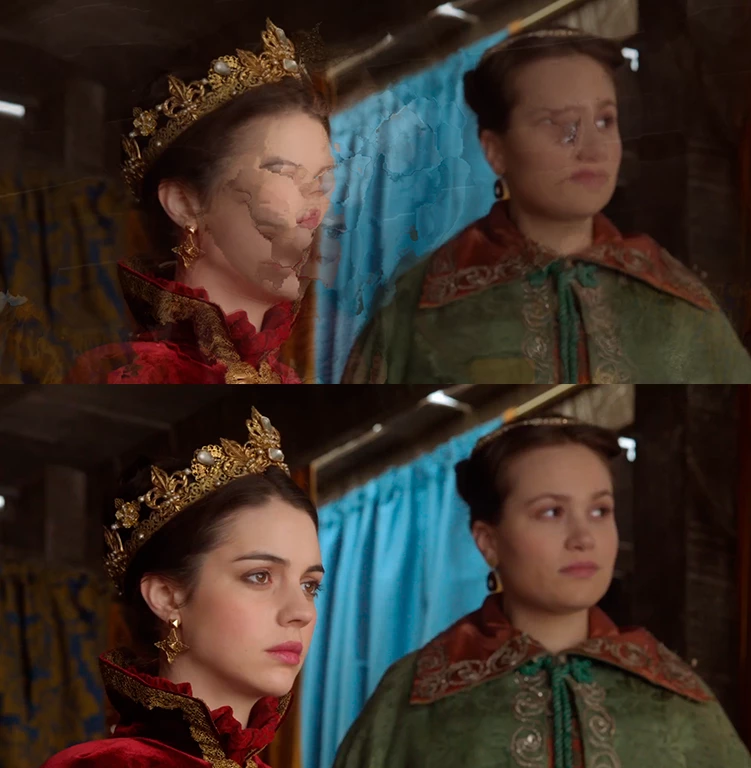
Clips looking weird at the beginning...please, look at the image here.

  • July 21, 2018
  • 2 replies
  • 208 views

Hi! This is my first time posting here, the thing is something weird has been happening with my clips lately and I don't even know how to describe it that's why I'm adding a picture. The only thing I've done to this cilp is changing the speed because I want it to be in slow motion, that's all! I've had this issue a couple of time before and the only solution I found was just deleting the beginning of the clip, but I don't want to that every time! Can someone help me, please?

(Also my premiere pro is up to date.)
This topic has been closed for replies.

2 replies

Kevin J. Monahan Jr.
Legend
July 25, 2018

Still having trouble with this, AlyVivar? Let us know.

Thanks,
Kevin

Kevin Monahan - Sr. Community and Engagement Strategist – Adobe Pro Video and Audio
Peru Bob
Community Expert
Community Expert
July 21, 2018

Try resetting the preferences:

FAQ: How to reset preferences in Premiere Pro?

If that doesn't work, try resetting the Workspaces:

Reset a workspace

Reset the current workspace to return to its original, saved layout of panels.

  1. Do one of the following:
    • Click the Workspace menu icon and select Reset to Saved Layout.
    • Choose Window > Workspace > Reset to Saved Layout.

from here:

https://helpx.adobe.com/premiere-pro/using/workspaces.html

If that doesn’t work,try updating or rolling back your graphics driver directly from the video card manufacturer’s site.