
Participant
October 21, 2013
Answered

Closed Captions Not Working (Premiere Pro 14.9 and earlier)

  • October 21, 2013
  • 14 replies
  • 152196 views

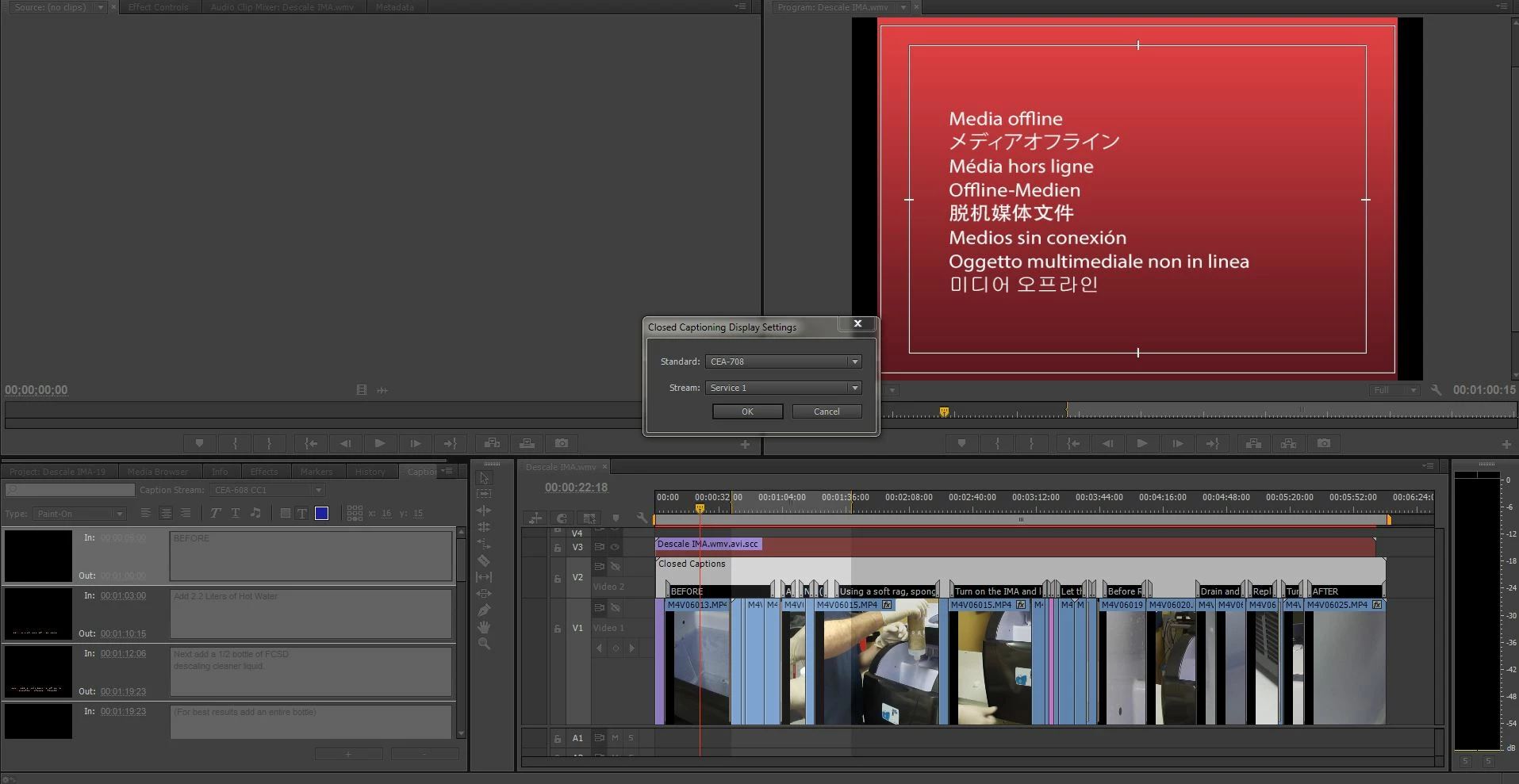
I am trying to create a closed caption in premiere pro cc (trial version) but when I am in the captions tab, am unable to select the 'add' caption button. I have enabled the captions and have watched many video tutorials and searched the web for answers but there is nothing about why the 'add' caption option might not be available?


[Please choose only a short description for the thread title.]


Message was edited by: Jim Simon
This topic has been closed for replies.
Correct answer Mark Mapes


I see two issues:

  1. If we're talking about the closed captions on Video 2 in the screenshot, then I notice that the track is disabled, as indicated by the slash across the eye icon.
  2. The caption clip that's loaded in the Captions panel is 608, but the Captions Settings panel is set to 708.

So you may need to set the Caption Settings to 608 and enable V2 by clicking the eye icon.

14 replies

polgrab
Participant
March 28, 2019

What helped to me,

Choose Open Subtitles 29,97 fps even if you have 25 fps sequence

Participating Frequently
March 28, 2019

Unfortunately, open subtitles do not work for our purpose to meet the legal requirement of having close captioning.

But thank you for the advice.

Participating Frequently
March 7, 2019

OK, so just FYI, my organization reached out to Adobe and it seems that there is a bug, which results in the 708 (HD) Closed Captioning to not display.

Thanks for your help, folks.

D

Stan Jones
Community Expert
Community Expert
March 7, 2019

Thanks for reporting.

Participating Frequently
March 6, 2019

Kevin,

   I am exporting an .MXF file and am trying to embed the captions; I am selecting 708. While playing the timeline, I can see the closed captions. But when I export the file I cannot see HD captions. Now, if I change the settings to 608, and export again, the file displays the SD captions.

How can I get the HD captions to work?

Thank you,

Daniel

Stan Jones
Community Expert
Community Expert
March 6, 2019

How are you looking at the export? You have exported MXF Op1 with both 608 and 708 and also only one?

Participating Frequently
March 7, 2019

Stan,

  I am exporting an MXF OP1 with embedded captions. I send the file to our server in Master Control where they play it at a station that displays closed captioning. The file that has been exported with the 708 does not show the captioning. The other file that I export using the 608 does display the captions. I am not sure what I am doing wrong.

matthiasr62158083
Participant
November 12, 2018

To make closed captions by hand in Premiere Pro you need a lot of patience.

This is a very poorly working function in Premiere Pro. It is very tedious and needs endless

formatting and editing. Unfortunately there is not many options to tweak the titles.

Just the coloring of background and Text alone requires a constant back and forth workflow.

Adobe needs to step up here to make it a better experience.

Participant
March 28, 2018

Guys, I founded a tutorial video (in the correct minutt link) that show us how to.
My premiere worked good till today, but this guy show me how:
https://youtu.be/Y0_UO8fBPIg?t=6m29s

https://youtu.be/Y0_UO8fBPIg?t=6m29s

Hope that work for you

etm1000
Known Participant
March 27, 2020

I followed everything in the video, exactly, and it doens't work.

Has anyone else found that in Premire Pro CC 2020 the captions don't work at all? 

Stan Jones
Community Expert
Community Expert
March 27, 2020

They are working in PR 2020. I  have not watched the video. What are the first steps you are taking, and what is the first thing that doesn't work?


Stan

Nokturnnia
Known Participant
September 3, 2017

It is a bug. I spent a good hour with somebody from Adobe remotely accessing my computer and they were equally puzzled.

Long story short, as of now, the close captioning tool won't work when outputting through Encoder.

Participant
August 16, 2016

Hello

So I've read through all the posts - the instructions and I produce captions professionally and am starting with excellent files meeting all required standards.

Last month when I had to lay back a show to HDCAM video tape - everything when smoothly - no problems. Done.

Today, I go to lay back again and NO CAPTIONS in the HD SDI output video! I have an impending deadline and this is the really slowing down the process. By all accounts and my own experience I should be seeing captions -

What is wrong?

Inspiring
October 20, 2015

Adobe staff, How can we edit the close caption timing with the handles in the timeline?  I notice there is handles but can manipulate them... it's very time consuming having to type in the timing phrase by phrase instead of just moving the little handles in the time line.

Cheers,

Adobe Employee
October 20, 2015

Thanks for the question: Right now you edit the captions end and start times in the Captions panel .. that is how we are doing it now ..

Inspiring
October 20, 2015

...ok thanks.

If at least it could automatically trim time when you type a new time instead of always warning me that I tried to overlap a time.  If we could edit the little handles we'd go 3x faster.

Nick Papps
Known Participant
September 17, 2015

This made all the difference for me, maybe it will help you!

Participant
April 9, 2015

Another person struggling with PCC2014 captioning. I'm required to create a closed captioned file for review for an ad that actually has no voiceover. So I just need to add a simple "[Music]" caption over the full 30sec sequence.

I created a new 608 caption, placed in on the timeline. It displays in my program monitor just fine. I export a QT file with captions embedded. Open it in QT, and the captions/subtitles button appears in the lower right of the player, but no captions show up.

I've tried changing sequence and caption frame rates (both 23.976 and 29.97, always matching them to each other). I've tried different quicktime exports. I've tried 708 captioning instead. No dice.

Anybody have any advice?

Known Participant
April 9, 2015

Give me a little more info on the type of quicktime you are exporting as well as what your editing sequence settings are.

Kevin

Participant
April 9, 2015

Sequence is 4K. 23.976fps. Captions are also 23.976fps CAE-608 CC1.

I've tried creating other sequences with different settings. 29.97 (with corresponding 29.97 captions). 1920x1080. Even a 960x540 sequence to ty to match my output specs.

My end export needs to be these (kind of strange) specs. These are for uploading to a broadcaster for review only, not final delivery.

Quicktime (.MOV)

H.264, 960 x 540 [HD] or 720 x 486 [SD] Millions

AAC, Stereo (L R), 48.000 kHz

Data Rate @2.22 mbits/sec

Closed Captioned

MUST BE UNDER 20 MB

I also tried a ProRes422 QT export matching all the sequence settings to see if it made a difference. Nope.

For each export, under the Captions tab I selected "Embed in output file".