Participating Frequently
June 25, 2024
Question

cmd + drag (or cmd + opt + drag) to swap clips is not working

  • June 25, 2024
  • 4 replies
  • 1416 views

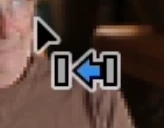
When I do cmd + drag or cmd + opt + drag I get some other function (see image below), but not clip swap.


I'm using the latest Premiere Pro on a 2020 M1 Mac.
 

This topic has been closed for replies.

4 replies

Participating Frequently
August 6, 2024

I've had issues with this too, while in older versions I had not. Either it's me, or Premiere's behaviour has changed.


Here's how it works for me in PPro 24.5.0:

  1. Press Control
  2. Start Dragging
  3. Press Alt wile dragging
  4. Release

While doing all this, PPro gives you visual feedback by changing the icons over the mouse cursor with every extra key pressed. 

Ann Bens
Community Expert
Community Expert
June 25, 2024

In short: Premiere does not have a swap feature.

Try and swap clip 1 with clip nr 10 in the timeline: does not work.

Riyo5FD6Author
Participating Frequently
June 26, 2024

Nobody said it would

Ann Bens
Community Expert
Community Expert
June 25, 2024

What you are seeing in your screenrecording is correct, clips dont get swapped.

You insert the clip and the rest of the timeline shifts to the right or left.


For windows its ctrl+alt.

Riyo5FD6Author
Participating Frequently
June 25, 2024

In the tutorial I'm using and in youtube videos explaining it the two clips are supposed to swap places, leaving the rest of the timeline unaffected.

https://www.youtube.com/watch?v=tCOZSTIojOE

Ann Bens
Community Expert
Community Expert
June 25, 2024

Well, you could call it swapping if you insert next to the adjacent clip.

In reality, it's not swapping but inserting and moving the adjacent clips.  In case of the tutorial its just one clip that gets moved to the right and appears like swapping.

The icon used is called re-arange.


MyerPj
Community Expert
Community Expert
June 25, 2024

Please use the actual version # from HELP/About... I'm on 24.5 and it's working here in Windows 11. Your video is hard to follow as you posted an icon which means move it to the left, but with ctrl+alt hold the mouse over the edit point at the head or tail of the clip and it shows the correct swap icon.

Riyo5FD6Author
Participating Frequently
June 25, 2024

24.5.0 Build 57

The image is the icon that appears when I press cmd and start dragging. The video shows what happens when I press cmd and drag or if I press cmd + opt and drag. The point is the two clips don't get swapped.

It's not really that big a deal, but if this shortcut/key combo doesn't work, it makes me wonder what else might not be working.

MyerPj
Community Expert
Community Expert
June 25, 2024

<<it makes me wonder what else might not be working.>> Wow, you're quite a detective!

Keep finding those tutorials and see what other things might not be working.

?

You've got to hold down both, ctrl+alt and keep them down while you release (drop) the clip to the swap location.
